
LinkedIn Profile URLs: Enrichment for AI Sales Agents
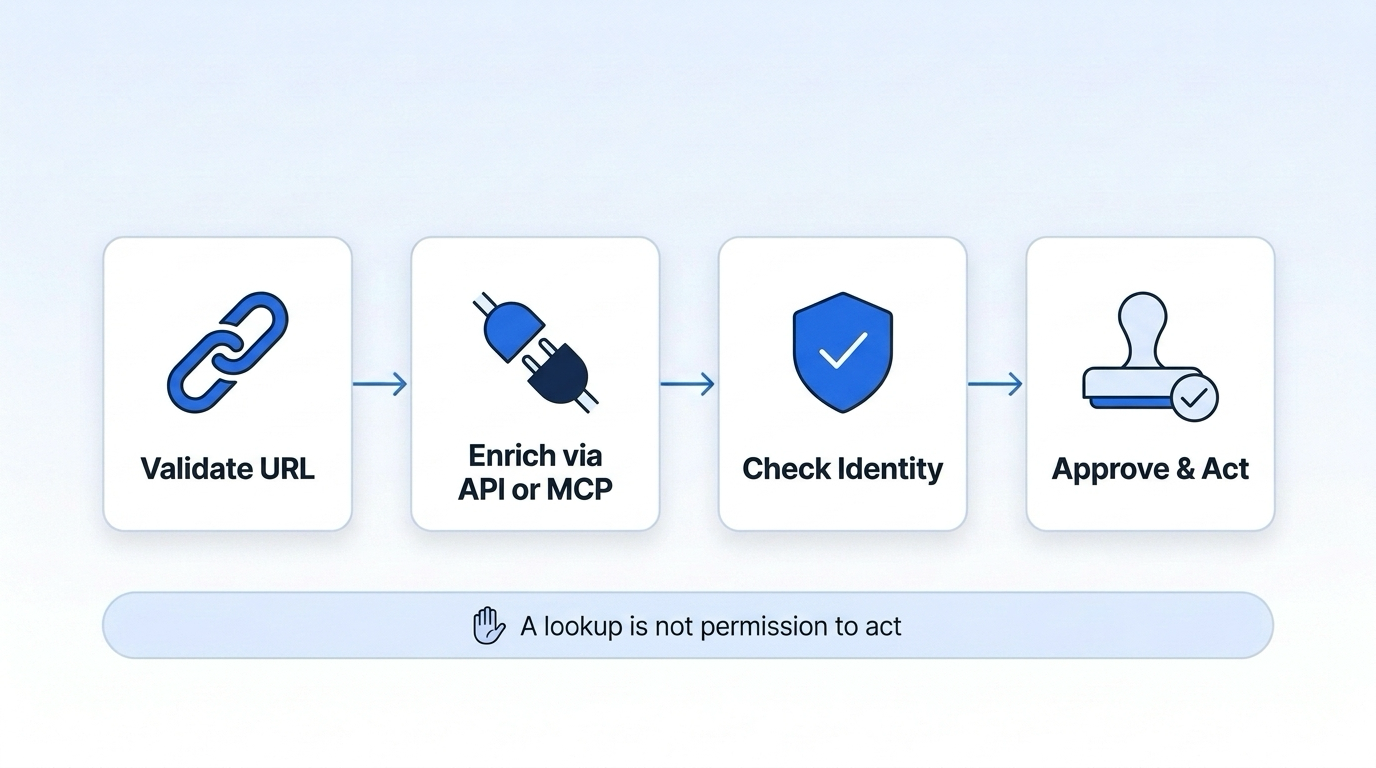
I use LinkedIn profile URLs to give AI sales agents role context - not proof of buying authority. Before any CRM update or outreach, I check the person’s identity, role dates, and source fields.
Datamagnet offers API and MCP access. A base profile costs 1 credit; each successful optional field adds 2 credits. Here’s how I keep that data use in check:
- Retrieve: Validate the URL, protect API keys, and set credit and retry limits.
- Check: Treat returned content as untrusted data. Keep missing or conflicting fields visible, and separate listed facts from agent guesses.
- Act: Require approvals, retain source records, and make CRM changes reversible.
- Roll out: Start with writes blocked, measure results, and review privacy rules and usage terms.
My rule: a successful lookup is not permission to act.
Request Profile Enrichment Through the API
Validate the URL and Set Up API Access
Once the agent has a clean profile URL, it can request current work history through a real-time people enrichment API for sales role context. Normalize the URL in your backend by removing only tracking parameters. Add a Bearer token to the Authorization header. The only required input is url. [1]
Keep the API token in secure backend storage - not in prompts or client-side code.
Handle Request Errors and Record Sources
Validate responses and record sources before using the data for agent decisions. A base profile request can succeed even when an optional field fails, so check the requested fields for errors. If one optional field fails, keep the base profile and log the field error rather than resending the full request. [1][3]
For rate limits, wait as long as the server specifies instead of retrying in a tight loop. Store profile_link and the fetch time separately from the CRM write time. This ensures you can auto-update CRM records without creating duplicate entries. [1][3]
Control Credits and Request Rates
Use credit checks and deduplication to control enrichment volume. A base profile costs 1 credit, and each successful optional field costs 2 more credits. Failed fields carry no extra charge. [1][2]
Before batching requests, check your credit balance with the free check_credits tool. [4] Deduplicate profile URLs within your freshness window to avoid repeat requests. [3]
If the agent needs direct tool access, the next section covers MCP configuration.
Connect the Sales Agent Through MCP
MCP lets an AI client discover and call Datamagnet tools directly. It does not grant permission to update a CRM, send outreach, or treat returned data as verified.[8][9]
Configure the MCP Server and Inspect Tools
Use MCP when the agent needs interactive tool access rather than a direct endpoint call. It retrieves the same role context from a profile URL.
Connect your MCP client to https://mcp.datamagnet.co/mcp using Streamable HTTP. Prefer OAuth 2.1 when supported; otherwise, use a bearer API key. Keep secrets out of the agent’s conversation.[3][5]
Start with tools/list to inspect the available tools and their schemas. Check required inputs and optional fields - don’t assume the API parameters carry over unchanged. Then submit the validated URL through tools/call, calling only the profile-enrichment tool needed for that URL.[6][7]
Before using the result, check response status, identity match, and field types.[8][9]
Compare API and MCP Access
Choose the access method that fits the task. The validation standard stays the same.
| Concern | Direct API | MCP |
|---|---|---|
| Tool discovery | Developers select endpoints and parameters. | Client inspects tools and schemas with tools/list. |
| Rate and retry control | Code controls retries, batching, and quotas. | Application constrains agent choices with allowlists, quotas, and timeouts. |
| Observability | Log requests, status, latency, and validation. | Also log the selected tool and the agent decision behind the call. |
| Best fit | Scheduled refreshes and predictable CRM pipelines. | Interactive profile lookup and guided enrichment. |
Use direct API calls for deterministic backend jobs and MCP for agent-led research. Both require application-side validation, logging, and authorization.[9] MCP calls use your plan’s credits and rate limits, not a separate allowance.[3]
Before the agent uses the data, validate identity and limit inferences, regardless of the access method. This ensures the data effectively supports lead qualification and scoring workflows.
Validate Profile Data and Limit Agent Inferences
Treat profile text, posts, and MCP output as untrusted data. Sanitize the content, block embedded commands, and limit tool access with allowlists and scoped credentials.[10][12][14][15]
Once that security gate is in place, check that the record belongs to the intended contact.
Check Identity, Data Types, and Role Dates
After retrieval, confirm the profile’s identity before using any field. Match the normalized profile URL and stable identifiers, such as linkedin_id or username, against the intended CRM contact. A similar name is not enough. Check the response against an approved schema, reject unexpected fields or executable content, and enforce payload and text-length limits. Validate list fields and their item types. Allow overlapping jobs, consulting work, and board roles instead of forcing a single current employer.[1][12][13]
Store derived fields, calculations, and generated recommendations separately from source facts, along with supporting evidence. For each retrieved fact, retain the provider field, source identifier, and timestamps. Preserve missing, null, and conflicting values. Fetch time is not the same as profile update time. Parse dates at month precision, leave current roles open-ended, and label tenure with both its source dates and calculation date.[1]
Handle Missing Data, Conflicts, and Failures
| Response condition | Safe agent behavior | Escalation |
|---|---|---|
| Invalid or unsupported URL | Stop enrichment; do not substitute another person or create a record. | Request a corrected URL. |
| Incomplete history | Use only returned, sourced facts; do not infer departures. | Flag missing required fields. |
| Possibly outdated fields | Keep verified CRM values; attach fetch times to discrepancies. | Verify before overwriting. |
| Identity conflict or duplicate | Block CRM writes and outreach; retain candidate records and matching evidence. | Require human identity resolution. |
| Conflicting titles or dates | Keep both sources; withhold definitive tenure calculations. | Review disputed claims before use. |
| Rate limit | Honor server retry timing; otherwise use bounded exponential backoff without duplicate retries. | Queue or alert operations after retry exhaustion. |
| Provider error or malformed response | Return unavailable; leave verified records unchanged. | Log the failure; retry only within policy. |
The agent should write summaries or update CRM fields only after these checks pass. This ensures high-quality CRM enrichment for HubSpot and Salesforce workflows.
Use Verified Facts in Outreach and CRM Updates
Once the record passes validation, use only sourced facts in outward-facing copy.
Base role summaries on sourced information and qualify them with dates. A job change needs dated evidence - not just a current title or an absent prior role. Never infer personality, confidential information, purchase intent, purchasing authority, political views, or reasons for leaving. Check generated summaries against source fields and remove unsupported claims.[11][12][14]
Before outreach or CRM writes, require the configured approvals. Retain field-level evidence, prior CRM values, and a reversible update record.[11][12][14]
Send only approved outreach that names the role and date range without inferring motivation or authority.[11][14]
Conclusion: Deploy a Validated Enrichment Workflow
Once you’ve validated profile URL enrichment for AI sales agents, move from testing to a controlled enrichment workflow rollout. Use only sourced profile facts in sales workflows, and keep missing or conflicting role data visible.
Check Production Controls and Track Quality
Before rollout, check URL validation and schema checks, secret storage, least-privilege access, credit and rate limits, schema checks, redacted logs, retention rules, deletion handling, and applicable privacy requirements.
Start in shadow mode, with writes blocked. Track profile-match rate, validation failures, median and p95 latency, credits per usable profile, CRM correction rate, human-review rate, and rejected responses. Expand automation only when results meet documented acceptance thresholds.
Put production controls in place first. Usage permissions define the legal boundary.
Review Data Access and Usage Permissions
Datamagnet enrichment uses LinkedIn profile data, but permissions depend on the product and its current terms.[16][17]
Before enabling CRM writes or outreach, have legal and security teams review Datamagnet’s terms, applicable privacy requirements, LinkedIn-related restrictions, and internal policies. Document approved uses, fields, retention periods, deletion duties, and whether storage, redistribution, or AI processing is allowed.[16][17]
Frequently Asked Questions
How often should my agent refresh profile data?
Get the latest context when you need it. Datamagnet fetches profiles live at request time. To balance cost and speed, set use_cache to if-recent for data no older than 29 days, or never to force a live fetch with every request.
Stay within your API plan’s rate limits. Follow the server’s wait instructions rather than retrying in a loop. [1][2]
When should I choose API access over MCP?
Use the direct API for programmatic integrations, custom software, or high-volume workflows that handle requests through standard REST headers.
Use MCP to let AI tools look up data in their native interfaces. Browser-based authentication means you don’t need to manage or copy API keys. Both methods have the same credit costs, rate limits, and real-time data access.
What evidence should trigger human review?
Trigger human review when data is non-deterministic or ambiguous. This includes null API values for critical profile metrics, such as follower count, which indicate that the source could not be read reliably.
Datamagnet provides real-time data, but high-stakes outreach still needs review when it involves inferred career milestones or sensitive relationship data in professional recommendations. Always review system-flagged write actions, such as signal creation or deletion, to check agent compliance.
