
How to Get LinkedIn Skills Data: API Guide 2026
To get LinkedIn skills data with Datamagnet, I send a permitted profile URL to POST /api/v1/person and read message.skills. A public URL does not guarantee access, and an empty skills list does not mean the person lacks those skills.
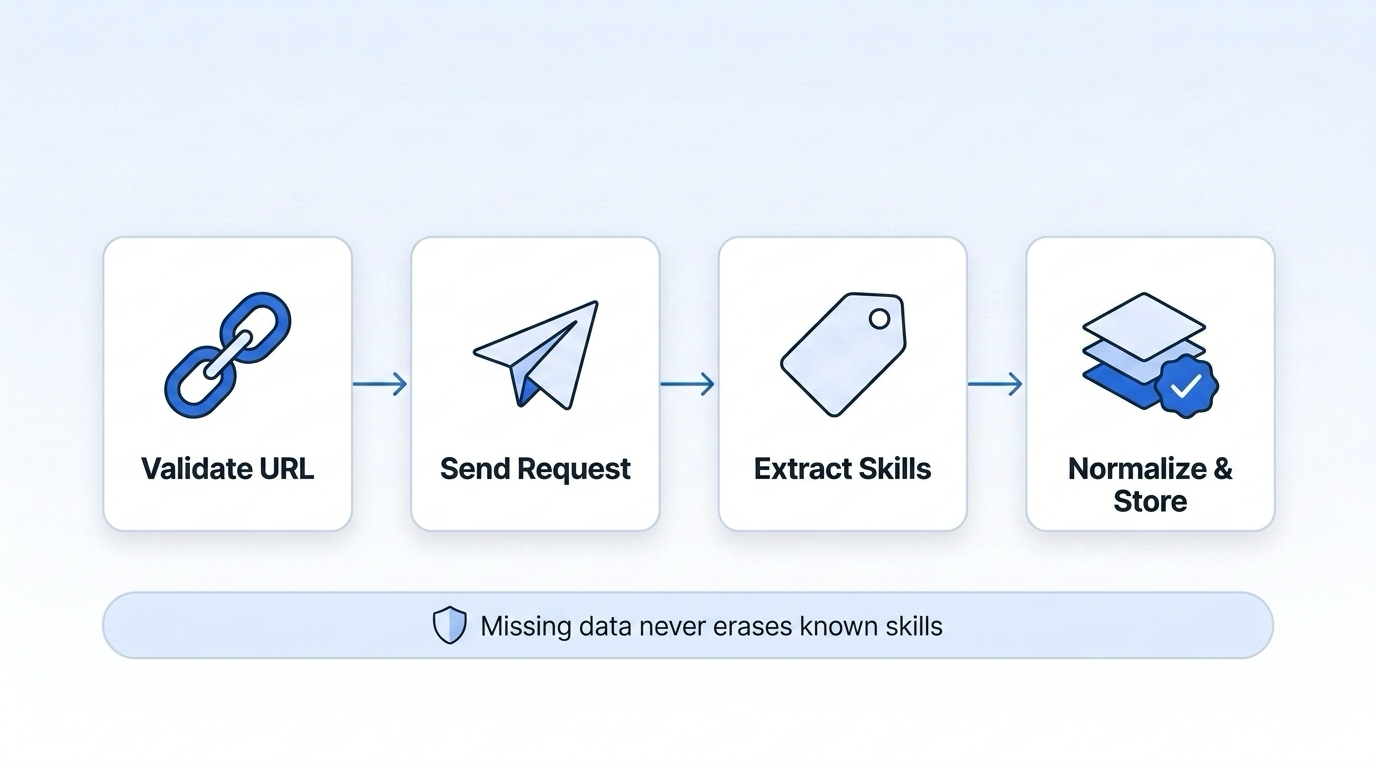
My setup covers four steps:
- Send safely: Validate the profile URL and keep API credentials on the server.
- Check the data: Confirm the response format, preserve original skill labels, and normalize copies for matching.
- Handle failures: Separate missing data from request errors, limit retries, and prevent duplicate writes.
- Test and track: Test missing-field cases, record data sources and timestamps, schedule updates, and monitor limits and credits.
Missing data should never erase known skills. I also confirm permission, set retention limits, and plan for deletion requests before storing results. For spending controls, I set alerts at 75%, 90%, and 100% of the credit budget.
1. Submit a Profile URL for Live Enrichment
Once permission is confirmed, submit a normalized LinkedIn profile URL to the LinkedIn enrichment API. Datamagnet typically responds in under 200 ms, though live collection can take longer.[3][5]
Validate and Normalize the Profile URL
Use a URL parser to check the input. Require HTTPS, a linkedin.com hostname, and an /in/{profile-id} path. Reject embedded credentials, nonstandard ports, malformed URLs, and non-profile pages. Validate the parsed hostname - not the raw string.[1][6]
Remove query strings, fragments, and trailing slashes before submission. Keep the original input separately for auditing, and use the normalized URL for requests and deduplication. A valid URL alone doesn't mean the profile can be retrieved.
Send the Enrichment Request Securely
Send POST /api/v1/person with bearer authentication and the required url property.[1][6]
curl --request POST \
  --url https://api.datamagnet.co/api/v1/person \
  --header "Authorization: Bearer $DATAMAGNET_API_TOKEN" \
  --header "Content-Type: application/json" \
  --connect-timeout 5 \
  --max-time 30 \
  --data "$VALIDATED_PROFILE_JSON"
Serialize {"url": normalizedUrl} into VALIDATED_PROFILE_JSON. Never inject raw input into the shell.
After submission, check the HTTP status and JSON content type. Parse the response body and confirm that it contains the expected JSON object. Save the normalized URL and retrieval timestamp with the result. Once the response passes these checks, extract the skills array from the returned body. This data is essential for building recruiter-ready shortlists from raw profile data.
2. Extract and Normalize Skills from JSON
Once you’ve parsed the JSON body, extract the skills field first.
Check the Skills Path and Array Type
Start with response?.message?.skills, then map any secondary skill fields you already ingest.[1][4]
Check that the value is an array before iterating. Each item must be a nonblank string. Flag unexpected items instead of silently dropping them. Datamagnet consistently includes the key, but your code should still check for unexpected types.
Track each response condition with a separate internal status:
| Response condition | Internal status | Stored skills |
|---|---|---|
| Valid nonempty array | present | Normalized list |
| Empty array | empty | [] |
null or empty string | unavailable | null; retain the reason |
| Invalid schema or malformed items | invalid_schema | No trusted replacement |
| Failed enrichment request | request_failed | No replacement |
Keep Original Labels and Field Status
After confirming the array shape, keep the returned labels and normalize only for matching. Apply Unicode normalization, trim leading and trailing whitespace, collapse internal spaces, and use consistent case folding. Match on the normalized value; display the original label.[9]
Don’t remove punctuation, translate labels, or automatically merge related skills. Treat labels as display text, not IDs.[9]
Deduplicate by normalized label, keeping the first occurrence in the returned order. If you combine profile and role-specific skills, retain every source-field path for each label you keep.
Store the original label, normalized value, source path, internal status, provider, timestamp, and schema version or request ID. Keep a protected copy of the raw skills fragment for reprocessing. Null or empty data does not prove a lack of expertise.[8]
3. Handle Errors, Retries, and Rate Limits
After parsing skills, classify every response before writing data, retrying the request, or recording billable usage.
Classify Errors and Log Request Details
Check both the HTTP status and the response body. Datamagnet can return an error object with HTTP 200, so inspect error and retryable before accepting a result.[2][7] At the retry layer, classify empty-skills responses as success_without_skills and do not retry them. Route malformed JSON and parsed error objects to the error path.
| HTTP status | Common meaning | Action |
|---|---|---|
| 400 | Invalid URL or parameters | Fix the input; do not retry it unchanged |
| 401 | Missing or invalid credentials | Securely refresh or replace credentials; retry only after the change |
| 403 | Permission or plan restriction | Confirm account entitlement and access before retrying |
| 404 | Resource or endpoint not found | Check the URL and resource state; do not assume the profile was deleted |
| 429 | Rate or quota limit reached | Honor Retry-After, reduce concurrency, and reschedule |
| 500 | Internal provider failure | Retry with exponential backoff and jitter if the request is safe to repeat |
| 504 | Gateway or upstream timeout | Retry cautiously with a deadline and bounded backoff |
Log the HTTP status, provider error type, request ID, UTC timestamp, endpoint, latency, attempt number, retry decision, and a redacted profile reference. Never log API keys, authorization headers, full payloads, or raw profile data. Keep the provider’s error details alongside your internal classification, and use the same request ID across retries and downstream writes.
Retry Without Duplicate Updates
Use bounded exponential backoff with jitter for temporary failures that qualify for retries. Honor a valid Retry-After header, whether it specifies seconds or an HTTP date. If the wait would exceed your job deadline, defer the job rather than retrying early.[10]
Datamagnet states that failures marked retryable: true do not consume credits. But a client timeout can happen after the provider has completed the lookup. Use its X-Request-Timeout header to help align the provider’s response window with your client timeout.[2][7]
Deduplicate queued jobs using the normalized profile URL, operation, and refresh identifier. Claim jobs atomically. Make downstream writes idempotent with an upsert on a stable profile key, and prevent older results from overwriting newer ones. Use API idempotency keys only when the provider documents support.
For sustained timeouts, 5xx errors, or 429s, open a circuit breaker for the affected provider or endpoint. Pause requests, move queued jobs to a delay queue, then allow limited recovery probes. Do not retry input, credential, or access errors without first fixing the cause.
Track Request Limits and Credits
Once response handling is stable, track request volume and credit usage by request type. Throttle requests to Datamagnet’s documented account limits. Reschedule rate-limited jobs without counting queued work as completed usage.
Track submitted requests, retries, successful enrichment responses, empty-skills responses, failures, and credits separately. Set budget alerts at 75%, 90%, and 100%.
Datamagnet lists a charge of 1 credit per successful person-profile request, plus 2 credits per successful enrichment flag. Failed flags are not charged. A completed not-found lookup marked retryable: false can still cost 1 credit.[1][3][7] Check current prices and account limits before deployment.
4. Test and Deploy the Skills Integration
Test Missing Data and Request Failures
Once response handling is stable, test every field state before enabling writes to your B2B data enrichment pipeline.
Build fixtures for populated, empty, missing, null, malformed, duplicate, inaccessible, throttled, and partial responses. For each fixture, assert the field status and expected action: write normalized skills, keep existing skills when data is unavailable, or retry without writing. Unavailable data must not clear known skills. Treat [] as empty only if the API contract defines it that way.
Before each write, validate the HTTP status, content type, JSON parseability, response shape, profile ID, and skills type. Run these checks in CI/CD. Then deploy behind a feature flag in shadow mode, with downstream writes disabled. Check validation failures and empty-result rates before gradually enabling writes. Keep a rollback path to the last known-good parser.
Store Data Sources and Set Update Schedules
After the parser passes fixture tests, store provenance and set refresh schedules based on business needs.
Record the source URL, canonical URL, provider/request ID, retrieved_at, field status, parser version, and raw and normalized skills. Keep source_updated_at separate from retrieved_at. Retrieving a profile doesn't prove it has changed.
Weekly refreshes for active recruiting records and monthly refreshes for lower-priority CRM records are useful starting points - not provider requirements. Add scheduling jitter and prioritize urgent records within your credit budget. If a refresh fails, show the age of the last successful result instead of clearing it.
Conclusion: Skills Enrichment Checklist
Before enabling sync, verify URL validation, response and schema checks, label preservation, deduplication, explicit missing-field states, retry rules, duplicate-write protection, rate and credit monitoring, provenance, and scheduled updates.
Frequently Asked Questions
What permission do I need to collect LinkedIn skills?
You don’t need special permissions or a connected LinkedIn account to collect LinkedIn skills data with the Datamagnet API. Register for an account, get your API key, and submit the public LinkedIn profile URL to the /api/v1/person endpoint.
Datamagnet retrieves skills and other profile details live when you make the request. You don’t have to manage LinkedIn authentication or permissions.
How can I tell whether skills data is outdated?
Datamagnet fetches data from the public LinkedIn profile when you make a request. The skills information reflects what’s publicly available at that time [1][2].
If you need up-to-date data, set use_cache to never in your API request. This skips the cache and forces a live fetch [3][4].
How should I reconcile conflicting skill labels?
Datamagnet pulls data directly from the live LinkedIn profile each time you make a request. The returned JSON contains the skill labels currently shown on that profile - not an outdated database snapshot. That means you don’t have to sort out conflicting labels manually.
To keep your database consistent, use the live JSON output as the single source of truth for each enrichment request.
