
Disclosure: Datamagnet publishes this article. Product capabilities described below are based on public documentation, retrieved September 18, 2026.
What Is B2B Data Enrichment? How It Works, Data Types, and Tools (2026 Guide)
B2B data enrichment is the process of taking a partial record — an email, a domain, a LinkedIn URL — and appending verified details like company size, job title, tech stack, or funding history to it. It's how a CRM row with three fields turns into a profile a rep can actually work.
Most B2B databases go stale faster than teams realize. Median U.S. employee tenure dropped to 3.9 years in January 2024, the lowest since 2002 (U.S. Bureau of Labor Statistics, 2024) — which means a meaningful slice of any contact list is already out of date. This guide walks through how enrichment actually works, the five data types you can append, the three delivery models on the market, how accuracy gets measured, and how to pick a provider without buying more than you need.
TL;DR
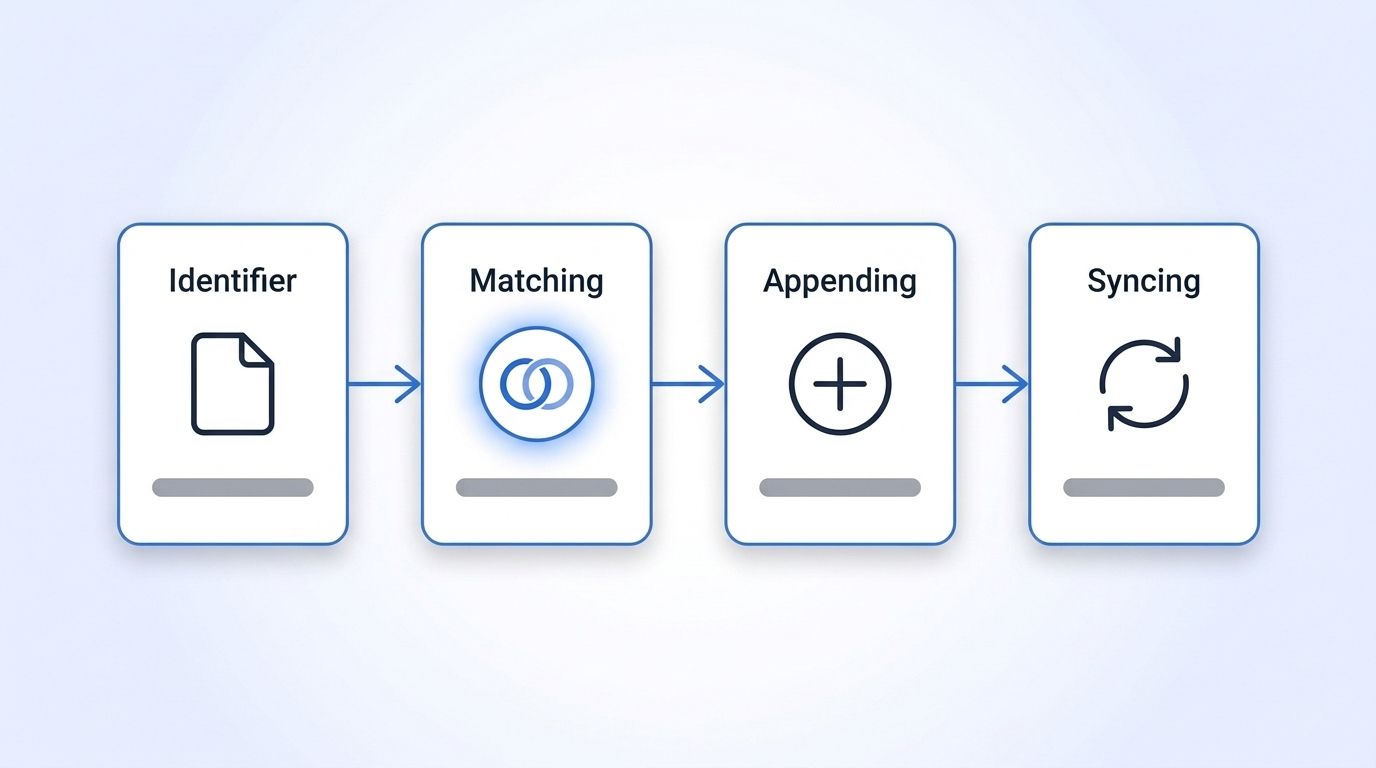
- B2B data enrichment appends verified company and people data to a partial record through four steps: identifier → match → append → sync.
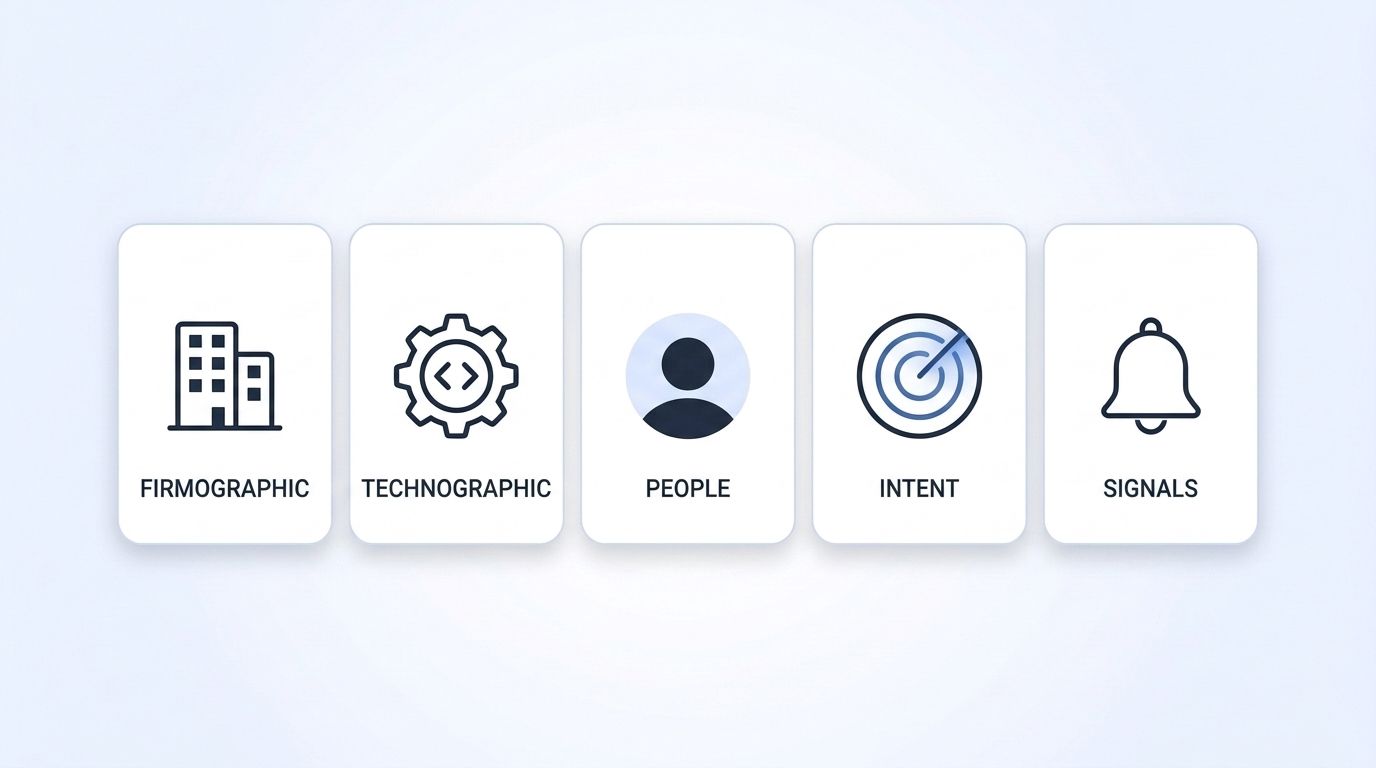
- Five core data types exist: firmographic, technographic, people, intent, and signals — each answers a different targeting question.
- Delivery comes in three models — batch, real-time API, and waterfall — and picking wrong is the most common cause of stale enrichment.
- Median job tenure fell to 3.9 years in 2024 (BLS), so enrichment done once at import time starts decaying immediately.
- No single provider wins on every axis — match rate, freshness, and price trade off differently depending on whether you need bulk records or live lookups.
How Does B2B Data Enrichment Work?
B2B data enrichment runs through four steps: you feed in an identifier, the provider matches it against a data source, verified fields get appended to the record, and the result syncs back to wherever you store it. Each step can fail independently, which is why match rate and sync reliability matter as much as the data itself.
Step 1 — Identifier. You supply whatever partial data you already have: an email address, a company domain, a LinkedIn URL, or a name-plus-company pair. The stronger the identifier, the higher the odds of a clean match. A LinkedIn URL is close to unique; a first-name-only lead is not.
Step 2 — Match. The provider's system searches its index or queries a live source for a record that corresponds to your identifier. This is where match rate lives or dies — a provider matching against a two-year-old static snapshot will miss people who've since changed jobs, while one that queries live LinkedIn data at request time reflects the current state of the profile.
Step 3 — Append. Once matched, the provider attaches the fields you requested: headcount, industry, job title, tech stack, funding round, whatever the plan covers. Good providers only append fields they can verify — a provider that guesses a phone number rather than confirming it is trading fill rate for accuracy.
Step 4 — Sync. The enriched record writes back into your CRM, warehouse, or outreach tool, usually via API, webhook, or a native integration. Programmatic enrichment that syncs automatically on record creation catches new leads the moment they enter your CRM, instead of waiting for a scheduled batch job to run.
<!-- [UNIQUE INSIGHT] -->Most teams evaluate enrichment providers on the append step alone — how many fields, how much data. That's the wrong lens. A provider with fewer fields but a stronger match step gets you more correct records; a provider with more fields but a weak match step just gets you more wrong guesses attached to the right name.
Citation capsule: B2B data enrichment isn't one action — it's a four-step pipeline of identifier, match, append, and sync, and a weak link anywhere in that chain undermines the whole record. A provider can offer dozens of appendable fields and still deliver bad data if its match step relies on a stale snapshot instead of a live source.
What Types of B2B Data Can You Enrich?
Five core data types cover most B2B enrichment use cases: firmographic (company facts), technographic (tech stack), people (individual profiles), intent (buying signals), and signals (real-time events). Each answers a different question — who they are, what they use, who works there, what they're researching, and what just changed.
| Data type | What it tells you | Example fields | Typical source |
|---|---|---|---|
| Firmographic | Company-level facts | Headcount, industry, HQ location, revenue band, funding | Company registries, LinkedIn company pages, Crunchbase-style funding databases |
| Technographic | What software a company runs | CRM, cloud provider, marketing stack, dev tools | Job postings, website scans, DNS/SSL records |
| People | Individual professional data | Job title, seniority, work history, education, skills | LinkedIn profiles, professional networks |
| Intent | What a company is actively researching | Content consumption, keyword surges, review site visits | Co-op intent networks, content publisher data |
| Signals | Real-time trigger events | Job changes, new hires, posts, funding announcements | Live monitoring, webhooks, event-based APIs |
Firmographic and people data are the foundation — most GTM stacks enrich these first because they power basic segmentation and routing. Technographic and intent data layer on top to sharpen targeting once the basics are in place. Signals are the odd one out: instead of describing a static state, they tell you the moment something changes, which is why job-change and engagement signal APIs get used for time-sensitive outreach rather than static list-building.
<!-- [PERSONAL EXPERIENCE] -->Teams that start with all five data types at once usually stall — there's too much to action on day one. Starting with firmographic plus people data, then adding signals once routing works, is a more common path to something a sales team actually uses within the first month.
Citation capsule: The five B2B data types — firmographic, technographic, people, intent, and signals — aren't interchangeable; firmographic and people data describe who a target is, technographic and intent data describe what they're doing, and signals describe what just changed, each requiring a different refresh cadence to stay useful.
Batch, Real-Time API, or Waterfall: Which Delivery Model Fits Your Stack?
Batch enrichment processes a list all at once on a schedule, real-time API enrichment queries live data the moment you need it, and waterfall enrichment chains multiple providers together to maximize match rate. Picking the wrong model is the most common reason enrichment "works" at launch and then quietly stops matching reality.
| Model | How it works | Best for | Trade-off |
|---|---|---|---|
| Batch | Upload a list, get an enriched file back on a schedule (daily/weekly) | Large one-time cleanups, periodic list refreshes | Cheapest per record, but data is stale the moment the batch finishes |
| Real-time API | Query a single record at the moment you need it (form fill, CRM create) | Lead routing, inbound qualification, live lookups | Freshest data, but priced and architected per-request, not per-bulk-file |
| Waterfall | Query provider A, fall through to provider B/C for unmatched records | Maximizing fill rate on hard-to-match records | Highest match rate, but adds latency and often costs more per fully-resolved record |
Batch still makes sense for a one-time database cleanup or a quarterly list refresh — you're not paying for freshness you won't use. Real-time API delivery fits any workflow where the enrichment needs to reflect the current state of a record, like a webhook-delivered signal firing the moment someone changes jobs. Waterfall setups, often orchestrated through a tool like Clay, exist specifically to squeeze out the last 10-15% of hard-to-match records nobody's single database covers alone.
Citation capsule: No single delivery model wins outright — batch is cheapest for static cleanups, real-time API delivery is the only option that reflects a record's current state, and waterfall trades added latency and cost for the highest possible match rate on records a single provider can't resolve alone.
How Is B2B Data Enrichment Accuracy Actually Measured?
B2B data enrichment accuracy gets measured on two separate axes: match rate (the percentage of input records the provider successfully finds a corresponding profile for) and field accuracy (whether the appended values are actually correct once matched). A high match rate with low field accuracy is worse than a low match rate with high accuracy, because wrong data drives bad decisions with false confidence.
The stakes are real: businesses that reported losing a customer or failing to close a new contract due to incomplete or inaccurate data made up one in five and roughly one in seven of those surveyed, respectively (Dun & Bradstreet survey via PR Newswire, 2019). That's not a data-hygiene inconvenience — it's lost revenue traced directly back to bad records.
Freshness compounds the accuracy problem. Since median tenure sits at 3.9 years and keeps trending down (BLS, 2024), any record enriched against a static snapshot starts decaying the day it's appended. There's no universal, audited industry standard for "acceptable" match rate — vendors report their own numbers using their own methodology, so ask any provider for their definition of a match before comparing percentages across vendors. A 95% match rate against an easy identifier (verified work email) and a 95% match rate against a hard one (first-name-plus-company) aren't the same claim.
<!-- [ORIGINAL DATA] -->When you're evaluating vendor-reported accuracy numbers, ask three questions before trusting the headline figure: what counts as a "match" in their methodology, how old is the underlying data source, and does the number apply to your specific identifier type or a best-case scenario. Providers that answer all three specifically, rather than pointing to a general marketing page, are the ones worth a paid trial.
Citation capsule: Enrichment accuracy isn't one number — it's match rate and field accuracy measured separately, and businesses that skip that distinction risk the kind of loss Dun & Bradstreet found in one in five surveyed companies that lost a customer over incomplete or inaccurate data.
What Mistakes Sink Most B2B Data Enrichment Projects?
Most B2B data enrichment projects fail for three repeatable reasons: enriching once at import instead of continuously, buying more data types than the team can act on, and trusting a vendor's headline match-rate number without checking the methodology behind it. Each mistake is avoidable and none require switching providers to fix.
The "enrich once" mistake is the most expensive because it's invisible. A record enriched correctly on day one looks fine in the CRM for months, and nobody notices the job title is wrong until a rep gets an outdated response on an email. Since roughly 72% of a rep's time already goes to non-selling tasks like admin and data entry rather than active selling (Salesforce, State of Sales, 2022), stale records just add more of exactly the work reps have too much of already.
Isn't it a little backwards that teams will negotiate hard over price-per-record but skip the harder question of how often that record gets re-checked? A cheap record that's wrong in six months costs more than an expensive one that stays current, once you count the rep hours spent chasing a dead lead.
Citation capsule: The three most common B2B enrichment failures — one-time enrichment, over-buying data types, and unverified match-rate claims — share a root cause: treating enrichment as a purchase instead of an ongoing process, which matters more given that reps already lose the majority of their week to non-selling admin work.
How Do You Choose a B2B Data Enrichment Provider?
Choosing a provider comes down to matching your delivery model and data type needs to what each vendor actually specializes in, not picking whoever has the biggest marketing claim about database size. Static-database vendors, live-API vendors, and orchestration layers solve different problems, and most teams end up needing more than one.
| Provider | Data model | Best for | Where it leads |
|---|---|---|---|
| ZoomInfo | Large static multi-source database + bundled platform | Enterprise teams wanting an all-in-one suite | Broadest contact database with intent, dialer, and workflow tools bundled |
| Clearbit (now HubSpot Breeze) | Firmographic enrichment API, HubSpot-native | Teams already standardized on HubSpot | Fastest deployment inside existing HubSpot workflows |
| Apollo | Contact database + outbound sequencing | SMB/mid-market outbound teams on a budget | Lowest cost per seat with prospecting and sequencing in one tool |
| People Data Labs | Bulk static dataset licensing | Data science teams building models on raw records | Largest raw record volume for offline, bulk processing |
| Coresignal | Firmographic and workforce datasets, periodic snapshots | Data teams needing structured historical exports | Deep historical headcount and workforce trend data |
| Clay | Waterfall orchestration across multiple providers | Teams wanting to combine several sources automatically | Best orchestration UI for chaining providers to maximize fill rate |
| Datamagnet | Real-time, request-time LinkedIn person/company/post/signal API | Teams needing live match-time accuracy plus job-change and engagement signals | Freshest point-in-time LinkedIn data and real-time signal delivery, pay-as-you-go |
Datamagnet isn't the right fit if you need a massive static database for bulk offline modeling — People Data Labs or Coresignal cover that better. It also isn't a built-in outbound sequencer the way Apollo is, and it doesn't bundle a dialer and intent co-op the way ZoomInfo does. Where it's a stronger fit is live, request-time lookups and job-change or engagement signals delivered as they happen, rather than in a scheduled snapshot — a narrower job than a full sales intelligence platform, done for pay-as-you-go pricing instead of an annual seat contract.
If your team already runs Clearbit-style enrichment inside HubSpot, migrating a live-lookup layer alongside it (rather than replacing the whole stack) is usually the lower-risk path. Check current pricing against your expected monthly record volume before committing to any one model.
Citation capsule: No provider wins across every criterion — ZoomInfo and Apollo bundle more workflow tooling, People Data Labs and Coresignal offer more raw bulk volume, and Clay orchestrates across all of them, while a live-API specialist like Datamagnet trades platform breadth for point-in-time freshness on LinkedIn-sourced data.
Start With the Data Type That Fixes Your Biggest Gap
B2B data enrichment isn't a single tool decision — it's four pipeline steps, five data types, and three delivery models that need to match your actual workflow, not just a vendor's feature list. Start with whichever data type addresses your current bottleneck (usually firmographic or people data), pick the delivery model that matches how fast that data needs to stay current, and re-check vendor match-rate claims against your own identifier types before signing an annual contract. See live LinkedIn people and company data in action — run a free lookup against your own list this week.
Frequently Asked Questions
What is B2B data enrichment in simple terms?
B2B data enrichment is adding missing details — like company size, job title, or tech stack — to a contact or company record you already have. You supply an identifier (email, domain, LinkedIn URL), a provider matches it to a data source, and verified fields get appended and synced back to your CRM.
What's the difference between data enrichment and data appending?
The terms are often used interchangeably, but "appending" typically refers narrowly to adding specific missing fields (like a phone number), while "enrichment" describes the broader process — identifier, match, append, and sync — that can add many field types at once, including firmographic, technographic, and intent data.
How often should B2B data be re-enriched?
Continuously where possible, not on a fixed calendar. Median job tenure fell to 3.9 years in 2024 (BLS), meaning some share of any list is out of date at any given moment. Real-time API lookups and job-change signals close that gap better than a quarterly batch refresh.
Is B2B data enrichment worth it for a small sales team?
It's worth it if manual research is eating rep time you can't get back — Salesforce's State of Sales research found reps spend roughly 72% of their week on non-selling tasks including data entry (Salesforce, 2022). A small team can start with a single data type (like people or firmographic) through a pay-as-you-go API rather than a full platform contract.
Can I combine multiple enrichment providers?
Yes — this is what a waterfall setup does, querying one provider first and falling through to others for unmatched records to maximize fill rate. Tools like Clay orchestrate this automatically, though it adds latency and typically costs more per fully-resolved record than a single-source lookup.
Sources
- U.S. Bureau of Labor Statistics, Median tenure with current employer was 3.9 years in January 2024, retrieved 2026-09-18, https://www.bls.gov/opub/ted/2024/median-tenure-with-current-employer-was-3-9-years-in-january-2024.htm
- Dun & Bradstreet (via PR Newswire), Dun & Bradstreet Survey Reveals One in Five Businesses Loses Revenue and Customers Due to Incomplete Data, retrieved 2026-09-18, https://www.prnewswire.com/news-releases/dun--bradstreet-survey-reveals-one-in-five-businesses-loses-revenue-and-customers-due-to-incomplete-data-300873093.html
- Salesforce, State of Sales Report (5th edition), retrieved 2026-09-18, https://www.salesforce.com/news/stories/sales-research-2023/
- Datamagnet, API Documentation, retrieved 2026-09-18, https://docs.datamagnet.co/api-reference/introduction
- Datamagnet, Webhooks, retrieved 2026-09-18, https://docs.datamagnet.co/api-reference/webhooks
