
Disclosure: This article is published by Datamagnet. Vendor claims are self-reported unless otherwise noted.
How to Use a Lead Enrichment API to Route Inbound Leads in Real Time (2026)
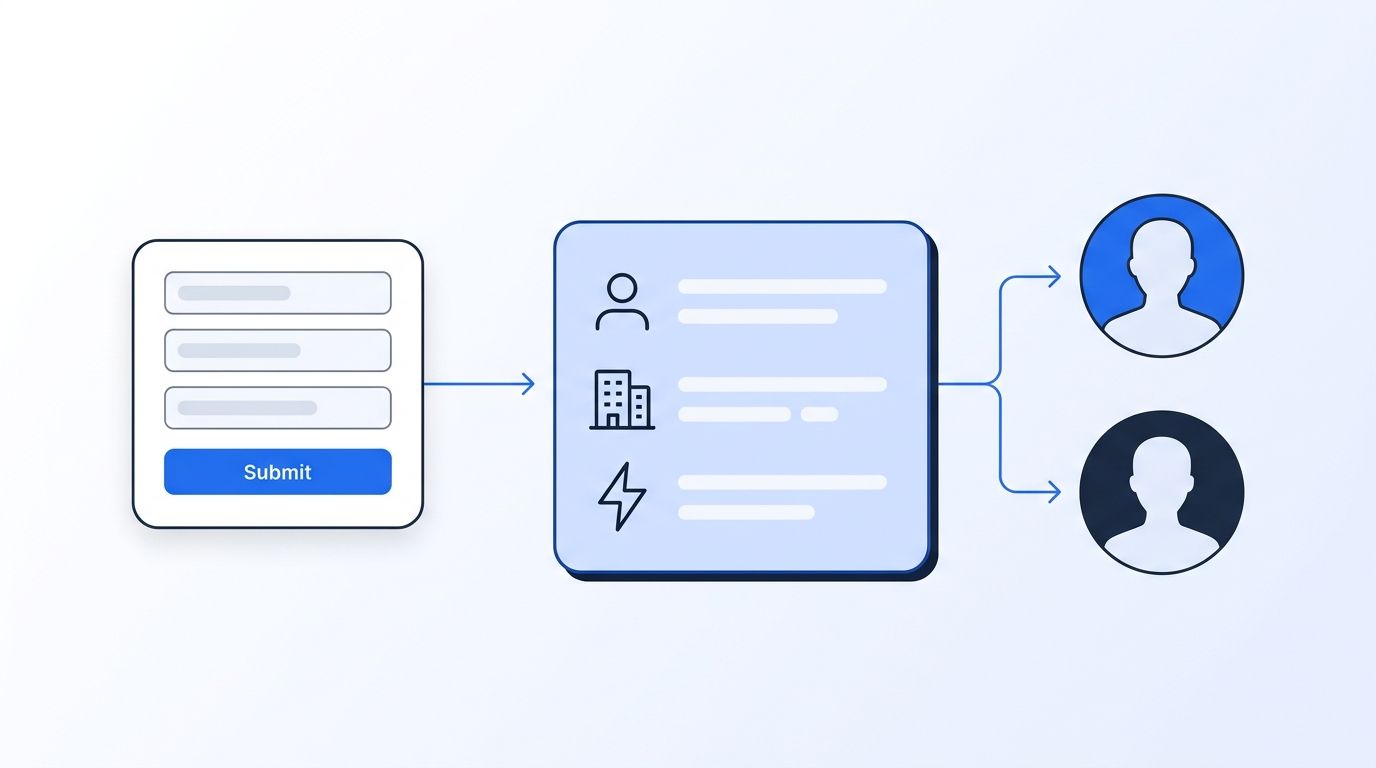
A lead enrichment API takes a thin form submission and returns the job title, company size, and industry you need to route it, all before the lead reaches a rep. This guide shows you how to wire that call into your form flow in about an hour. You'll finish with a working handler, a routing rule, and a fallback for when enrichment fails.
TL;DR
- In 2026, Chili Piper found the typical company books 42 meetings per 100 form fills, while top-quartile teams book 58.
- Real-time enrichment fills in the fit data your form doesn't ask for, so routing can happen in seconds.
- Datamagnet's People API starts from a LinkedIn profile URL and costs 1 credit per profile. It doesn't look up emails or phones.
Why Does Inbound Routing Break Without Enrichment?
Routing breaks because forms collect too little to decide anything. In 2026, Chili Piper's 2026 Web Conversion Benchmark (Mid-Market Edition) reported that the typical company books 42 meetings per 100 forms, and the top quartile books 58 (Chili Piper, 2026). The report calls these observational comparisons, not proof of cause.
So what separates the two groups? Part of it is what happens in the first minute after submission. A name and a work email don't tell you if the lead is a VP at a 2,000-person account or a student. Without that, you send everyone to the same round-robin queue and hope.
Bad data makes it worse. Gartner's data quality research puts the average cost of poor data quality at $12.9 million a year per organization (Gartner, research from 2020, cited again in 2021). That's an older figure, but it's still the number most teams quote.
Here's the tension. Every field you add to a form lowers completion, yet every field you skip leaves routing blind. Enrichment resolves that. You ask for less up front and fetch the rest from a live API.
If you're new to this idea, our guide to real-time B2B people enrichment covers the basics.
What Do You Need Before You Start?
Plan on about 60 minutes and intermediate skill. You should be comfortable with REST calls and a webhook handler in Python or Node. The setup is small: an API key, a form that can fire a webhook, a LinkedIn URL per lead, and somewhere to run a short script.
What you'll need:
- A Datamagnet account and API key (new accounts get 10 free credits, per the pricing page)
- A form tool or CRM that can send a webhook on submit
- A LinkedIn profile URL for each lead (more on this below)
- A place to run a small server, like a serverless function
One limit matters up front. Datamagnet's People endpoint takes a LinkedIn profile URL as its only identifier. It has no email, phone, or name input, and it doesn't do email or phone lookup. So your flow needs a way to get that URL. We'll cover three options in Step 1.
Step 1: How Do You Capture a LinkedIn URL With Each Lead?
By the end of this step, every inbound lead will carry a LinkedIn profile URL or be flagged as missing one. Datamagnet's People endpoint needs that URL as its only identifier, so it's the one hard dependency in the whole flow. Without it, nothing downstream can run.
You have three honest options:
- Add an optional "LinkedIn profile" field to the form. Short, and many B2B buyers will fill it in.
- Use a sales rep's research. For high-value inbound, a rep adds the URL by hand.
- Search for the profile. The People Search endpoint finds LinkedIn members by keyword with filters for job title, company, and name. Search costs 10 credits per page, so reserve it for leads that matter.
Normalize the URL before you store it. Strip tracking parameters and trailing slashes so cache hits stay consistent.
Verify it worked by submitting a test lead and confirming your handler logs a clean linkedin.com/in/... string.
All of this uses public profile data. Datamagnet collects it from public pages, and LinkedIn's terms restrict automated access to its service. That's a risk to understand if you build your own scrapers, since accounts that break those terms can be restricted. An API takes that infrastructure off your plate.
Step 2: How Do You Make Your First Enrichment Call?
By the end of this step, you'll have a live JSON profile for one test lead. This is a single POST to the person endpoint, authenticated with a Bearer token from your dashboard (Authentication docs). Each call costs 1 credit, so the 10 free credits cover several test runs.
curl --request POST 'https://api.datamagnet.co/api/v1/person' \
  --header 'Authorization: Bearer {token}' \
  --header 'Content-Type: application/json' \
  --data-raw '{ "url": "https://linkedin.com/in/example-profile", "use_cache": "if-recent" }'
The quickstart walks through the same call. Data comes back under a top-level message key. Useful fields include full_name, job_title, current_company_name, job_started_on, and country.
The setting that trips people up is use_cache. The default, if-present, can return an older stored profile. For routing, we use if-recent, which accepts data up to 29 days old. Set it to never if a stale title would cost you a deal.
Each profile call costs 1 credit. Check that message.job_title isn't empty, and you're done with this step.
Step 3: How Do You Add Company Firmographics?
By the end of this step, each lead will have company size and industry attached. Titles alone don't tell you if the account fits your ICP, so you also call the Company endpoint with the lead's current employer. A successful company call costs 1 credit.
Pass the company's LinkedIn URL in the same url field. The person response from Step 2 includes it as message.current_company_linkedin_url, and Step 4 shows the code that reads it. The response includes industry, employee_count, headquarters, and website. A successful company call costs 1 credit, so one fully enriched lead costs 2 credits.
Do you need funding data too? Add get_funding_rounds for 5 extra credits on that call. Most teams skip it for routing and use it only for enterprise-tier leads.
Where do you get the company URL? Read current_company_linkedin_url from the person response. If it's missing, route the lead to the manual queue.
Our LinkedIn Company API page lists everything the endpoint returns.
Step 4: How Do You Wire It Into Your Form Webhook?
By the end of this step, a form submit will trigger enrichment and end in a routing decision without making the visitor wait. Keep the handler small and fast, always set a timeout on outbound calls, and send anything that fails to a manual review queue so no lead is lost.
import queue
import threading
import requests

API = "https://api.datamagnet.co/api/v1"
HEADERS = {"Authorization": "Bearer YOUR_TOKEN",
           "Content-Type": "application/json"}
TARGET_INDUSTRIES = {"software development", "it services and it consulting"}  # your ICP

def call(endpoint, linkedin_url, retries=1):
    """POST to the person or company endpoint. Return `message`, or None on failure."""
    for _ in range(retries + 1):
        try:
            r = requests.post(f"{API}/{endpoint}", headers=HEADERS, timeout=8,
                              json={"url": linkedin_url, "use_cache": "if-recent"})
            r.raise_for_status()
            message = r.json().get("message")
            if message:
                return message
        except (requests.RequestException, ValueError):
            pass                       # network error, bad status, or bad JSON: retry
    return None

def to_int(value):
    """employee_count arrives as a string like "1,250", or null."""
    try:
        return int(str(value).replace(",", ""))
    except (TypeError, ValueError):
        return 0

def enrich(linkedin_url):
    """Person call, then Company call. Merge company fields into one profile."""
    profile = call("person", linkedin_url)
    if not profile or not profile.get("job_title"):
        return None
    company_url = profile.get("current_company_linkedin_url")  # from the person response
    company = call("company", company_url) if company_url else None
    if company:
        profile["employee_count"] = to_int(company.get("employee_count"))
        profile["industry"] = company.get("industry") or ""
    return profile

def pick_queue(profile):
    size = profile.get("employee_count") or 0
    industry = (profile.get("industry") or "").lower()
    senior = any(w in profile.get("job_title", "").lower()
                 for w in ("vp", "head", "director", "chief", "cxo"))
    if size >= 1000:                   # your enterprise threshold
        return "named-ae"
    if senior and industry in TARGET_INDUSTRIES and size >= 50:   # mid-market rule
        return "fast-track-sdr"
    return "nurture"

def route(lead, queue_name):
    # Replace with your CRM call (HubSpot, Salesforce, a Slack alert, etc.)
    print(f"lead {lead.get('id')} -> {queue_name}")
    return queue_name

def handle_lead(lead):
    profile = enrich(lead["linkedin_url"]) if lead.get("linkedin_url") else None
    if not profile or "employee_count" not in profile:   # no profile or no company data
        return route(lead, "manual-review")
    return route(lead, pick_queue(profile))

jobs = queue.Queue()   # async: the form endpoint only enqueues; a worker enriches

def worker():
    while True:
        handle_lead(jobs.get())
        jobs.task_done()

threading.Thread(target=worker, daemon=True).start()

def on_form_submit(lead):
    jobs.put(lead)                     # returns immediately
    return {"status": "thanks"}        # the visitor sees no delay
Notice the failure handling. The People docs don't specify status codes or an error shape for a failed base request, so call() treats any exception, bad status, or empty message as a failure. It retries once, then returns None. If the person call fails, or there's no company data to merge, the lead goes to manual review. Without that check, pick_queue would see a size of 0 and send everyone to nurture.
Two details are worth a second look. The person response carries the company's LinkedIn URL in current_company_linkedin_url, which enrich() passes to the Company call. And the Company endpoint returns employee_count as a string such as "327,095" (or null), so to_int() converts it before the size rules run. The in-process queue is a demo. In production, use your platform's job queue.
One docs-backed detail: optional enrichment flags can fail on their own. The failed field comes back as {"error": "Unable to fetch this data at this time."} while the base profile still succeeds, and you aren't charged for the failed enrichment.
Don't block the form response on enrichment. The code above returns "thanks" from on_form_submit right away, and a background worker does the enrichment. The lead feels no delay, and your routing still lands in seconds.
For HubSpot users, the HubSpot integration shows how to enrich on create. Clay users can follow the Clay integration.
Step 5: How Do You Build Routing Rules From Enriched Fields?
By the end of this step, leads will land in the right queue by fit, not by turn. Keep the first version simple, with three rules you can explain in one breath: one for enterprise accounts, one for mid-market fits, and a nurture default for everyone else.
| Rule | Condition on enriched data | Route to |
|---|---|---|
| Enterprise | employee_count above your threshold | Named AE |
| Mid-market | Industry in your target list, a senior job_title, and employee_count of 50 or more | Fast-track SDR |
| Everyone else | No fit match | Nurture queue |
The thresholds are yours. Datamagnet doesn't prescribe them, so base them on your closed-won accounts.
Routing method matters as well. Chili Piper's 2026 benchmark found that shared-availability routing booked 76% of meetings, versus 18% when only one rep's calendar was used (Chili Piper, 2026). That's an observational comparison. Still, it suggests pairing fit-based routing with a team calendar rather than a single owner.
In the same report, 62% of qualified form submissions booked a meeting. Enrichment helps you tell which submissions are qualified before anyone picks up the phone.
Step 6: How Do You Handle Failures and Watch Your Credits?
By the end of this step, a bad enrichment call won't lose a lead. Failures will happen, so plan for them with a fallback queue, a single retry, balance monitoring, and a log line for every call. Four small habits cover most of the risk.
- Fallback queue. Any lead without a profile goes to manual review, never to a dead end.
- Retry once on any failed call, as the Step 4 code does, then fall back. If an optional enrichment field returns an
errorobject, treat that field as empty. You aren't charged for a failed enrichment. - Monitor balance. Check it with the Credit Balance endpoint so a run doesn't stall mid-day.
- Log every call with the lead ID and credits used.
On cost, per the pricing page, Starter is $39 a month for 1,000 credits, Pro is $99 for 10,000, and Scale is $199 for 25,000. At 2 credits per fully enriched lead, 1,000 credits covers about 500 leads. Check the page for current pay-as-you-go options.
What Mistakes Should You Avoid?
Most routing mistakes come from four habits: enriching junk, trusting stale cache, blocking the form, and assuming complete responses. Each is cheap to fix once you know to look for it. Here they are, in the order we see them.
1. Enriching every lead, including junk. Spam and student sign-ups burn credits. Filter free-mail domains and obvious bots first.
2. Trusting cached data for high-stakes routing. The default cache can hand you an old title. Use if-recent or never for enterprise leads.
3. Blocking the user on the API call. Slow forms lose people. Enrich asynchronously.
4. Treating the response as always complete. Missing values come back as empty strings, empty arrays, or 0. Test for empties, not just null.
The mistake we see most is routing on a single field. A senior title at a two-person company isn't an enterprise lead. Combine title and company size.
What Does Success Look Like?
If it all works, a lead submitted at 10:00:00 sits in the right queue by 10:00:10, with title, company, and size attached. Your reps open a record that's already filled in, so the first conversation starts with fit instead of a research scramble.
Track three numbers: median seconds from submit to route, share of leads enriched, and meetings booked per 100 forms. Compare the last against Chili Piper's 42 median benchmark.
For a stretch goal, add signal monitoring so you hear about job changes on your key accounts too.
Frequently Asked Questions
What is a lead enrichment API?
A lead enrichment API is a service you call with a lead identifier, and it returns extra data like job title, company, and industry. Teams run it at form submit so routing and scoring use fit data, not just what the visitor typed. Datamagnet's version takes a LinkedIn profile URL and returns structured JSON at request time.
Can Datamagnet enrich a lead from an email address alone?
No. The People endpoint accepts a LinkedIn profile URL only, and Datamagnet doesn't offer email or phone lookup. To start from a name and company, use the People Search endpoint to find the profile first. That costs 10 credits per page of results, so use it selectively for your highest-value leads.
How much does real-time lead enrichment cost?
A profile costs 1 credit and a company lookup costs 1 credit, so a fully enriched lead uses 2 credits. Plans are $39 for 1,000 credits, $99 for 10,000, and $199 for 25,000 a month, and new accounts get 10 free credits. At 2 credits a lead, the $39 plan covers roughly 500 leads.
What happens if the enrichment call fails?
The docs don't list status codes for a failed base request, so treat any failed call as a failure: retry once, then send the lead to a manual review queue. If an optional enrichment field fails, it returns an error object in place of its data, the base profile still succeeds, and you aren't charged for that enrichment.
Ready to Start Enriching Before You Route?
You now have a pipeline: capture a LinkedIn URL, enrich the person and company, apply simple rules, and fall back cleanly. Try it with the 10 free credits on your next test lead, and see how it fits the People API. Start small, measure seconds to route, then tighten the rules.
Sources
- Chili Piper, 2026 Web Conversion Benchmark (Mid-Market Edition), retrieved 2026-11-17, https://www.chilipiper.com/reports/mid-market-conversion-benchmark
- Gartner, Data Quality: Best Practices for Accurate Insights, retrieved 2026-11-17 (figure confirmed via search snippet; page returned 403 on fetch), https://www.gartner.com/en/data-analytics/topics/data-quality
- Datamagnet, Pricing, retrieved 2026-11-17, https://www.datamagnet.co/pricing/
- Datamagnet Docs, Quickstart, People, Company, Authentication, retrieved 2026-11-17, https://docs.datamagnet.co/api-reference/quickstart
