
Disclosure: This article is published by Datamagnet. Vendor claims are self-reported unless otherwise noted.
How Often Should You Re-Verify Contact Data? A Cadence Guide
Most teams check contact data once, load it into the CRM, and never look at it again. That's a problem: B2B contact records decay 22-30% a year in aggregate, and some fields rot much faster than others (ZoomInfo Pipeline, B2B Data Decay: Rates, Costs, and How to Stop It, 2026). This guide gives you a specific re-verification cadence for every field, team size, and go-to-market motion, so you're not guessing.
Key Takeaways
- Email addresses decay roughly 23-43% a year and job titles 25-35% a year — the two fastest-moving fields in your CRM (ZoomInfo, 2026; ZeroBounce, 2026).
- 76% of CRM users say less than half their data is accurate and complete, and 37% report losing revenue directly because of it (Validity, State of CRM Data Management in 2025, 2025).
- There's no single "right" cadence. Weekly checks on active pipeline, monthly on marketing lists, quarterly on dormant accounts, plus event-triggered re-verification the moment someone changes jobs.
- Median U.S. job tenure dropped to 3.9 years in 2024, the lowest since 2002 — a structural reason company and title fields need more frequent checks than they used to (BLS, 2024).
How Fast Does B2B Contact Data Actually Decay?
In 2026, ZoomInfo found that business email addresses decay roughly 3.6% a month — compounding to as much as 43% a year in fast-moving sectors like tech and startups (ZoomInfo Pipeline, B2B Data Decay: Rates, Costs, and How to Stop It, 2026). That's not a rounding error. It means a list you verified in January could be nearly half wrong by December.
Job titles move almost as fast, decaying 25-35% annually — about 2-3% every month — as people get promoted, switch teams, or take a new role at a different company (ZoomInfo Pipeline, 2026). Direct-dial phone numbers are steadier but still shift 20-25% a year, mostly from office moves and number reassignments (ZoomInfo Pipeline, 2026).
Separately, ZeroBounce's Email List Decay Report for 2026, based on more than 11 billion verified email addresses, found list decay eased slightly to 23% annually in 2025, down from 28% in 2024 (ZeroBounce, 2026). Either way, you're losing roughly a quarter of your email list's accuracy every twelve months if you never touch it.
<!-- [ORIGINAL DATA] -->What this means practically: if your last full re-verification was over 90 days ago, treat every "high-confidence" segment in your CRM as a coin flip on job title accuracy. A quarter of decay compounds fast — three untouched quarters can put a list closer to 50% stale than 25%.
None of this is evenly distributed. Startups and tech companies see faster title and email churn than manufacturing or government accounts, because headcount and role changes happen more often. If you sell into high-growth verticals, shorten every cadence in this guide by roughly a third.
See how real-time enrichment keeps contact fields current for a deeper look at fixing decay at the source instead of after the fact.
What's the Right Re-Verification Cadence by Field?
There isn't one cadence for "contact data" — there's a different cadence for every field, because each one decays at a different speed. Email and job title need the tightest loop; company name and LinkedIn URL can go longer between checks.
Here's a practical cadence matrix built from those decay rates. Treat it as a floor, not a ceiling — high-growth verticals should check more often.
| Field | Decay speed | Recommended check | Why |
|---|---|---|---|
| Email address | Fastest (~23-43%/yr) | Weekly for active outreach, monthly for the full list | Bounces kill sender reputation fast |
| Job title | Very fast (25-35%/yr) | Monthly, or event-triggered on job-change signal | Wrong title breaks personalization and routing |
| Company / employer | Fast, tied to tenure | Monthly, or event-triggered | Median tenure is now 3.9 years and falling |
| Direct-dial phone | Moderate (20-25%/yr) | Quarterly | Slower-moving than digital fields |
| LinkedIn URL | Slow (rarely changes) | Quarterly to semi-annual | Stable identifier once matched correctly |
Most vendor guidance treats "data hygiene" as one undifferentiated task — a single monthly cleanup pass. That's why so much CRM data still goes stale: a monthly pass is too slow for email and too frequent to be worth the cost for LinkedIn URLs. Matching cadence to each field's actual decay rate, instead of applying one blanket schedule, is what closes the gap.
You can pull live job title and company data on demand through the People Profile endpoint instead of waiting on a batch refresh.
How Should Cadence Change by Team Size and Use Case?
A five-person SDR team chasing 200 active accounts needs a tighter loop than a 40-person marketing team nurturing 80,000 contacts — not because one team cares more, but because the cost of stale data hits each of them differently.
For active outbound pipeline (accounts a rep is actively working), re-verify weekly. A wrong title or a bounced email on an in-motion deal costs a meeting, not just a data point. For ABM target account lists, monthly is usually enough — you're tracking a bounded, high-value list where a job change should trigger an immediate refresh anyway, covered below.
Marketing automation lists decay the fastest in relative terms because they're large and rarely touched between campaigns — monthly verification (or at minimum, pre-send verification) protects deliverability. Recruiting pipelines should re-verify candidate contact and current-employer data monthly, since a stale "current company" field defeats the point of sourcing by tenure or flight risk.
<!-- [PERSONAL EXPERIENCE] -->Teams that skip verification on "dormant" segments almost always regret it during a re-engagement campaign — you send to a list that's been sitting for six-plus months, and the bounce rate alone tells you how much of that list has already moved on.
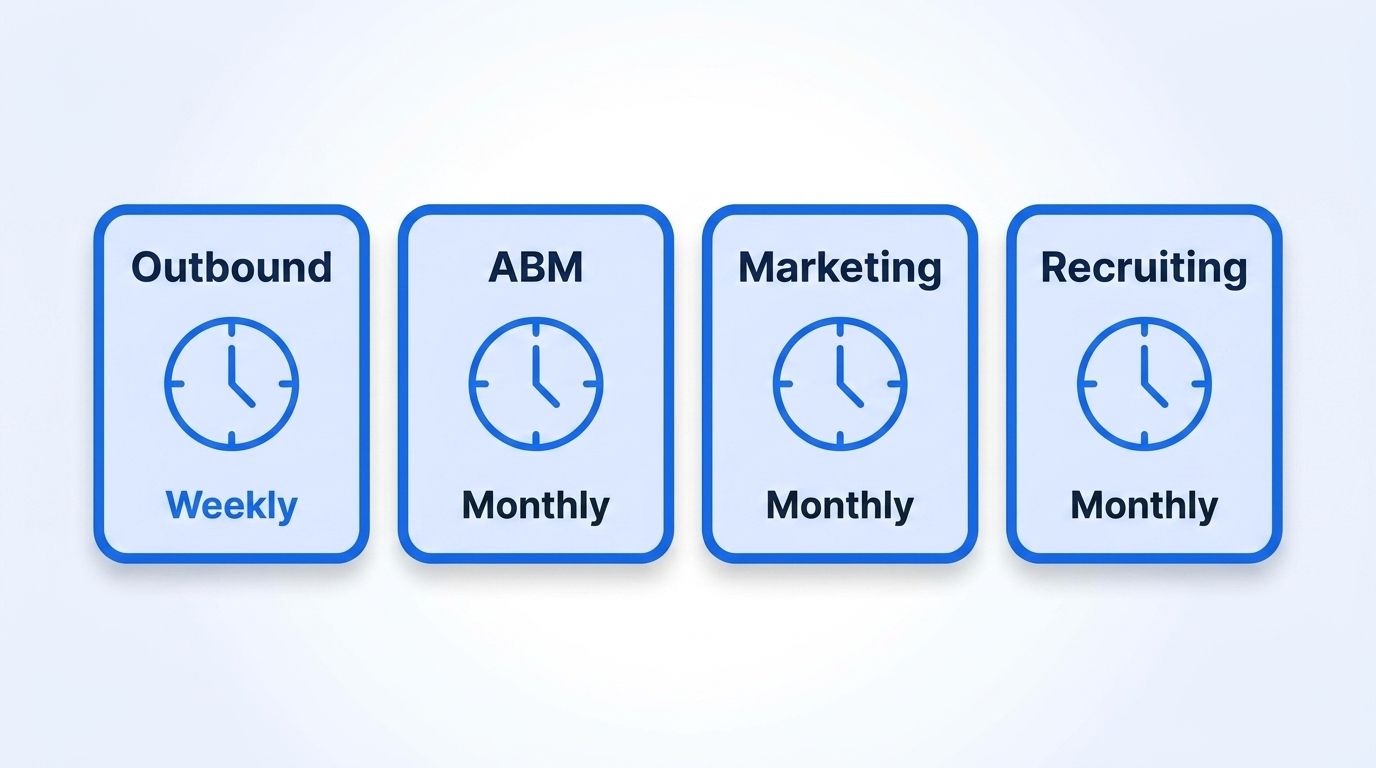
For dormant or closed-lost accounts, quarterly is fine — you're not spending rep time on them, so the cost of some drift is low until you reactivate them.
What Triggers Should Force an Off-Cycle Re-Verification?
A fixed calendar schedule misses the events that actually matter most: someone changes jobs mid-cycle, and every field tied to that person goes stale at once — title, company, seniority, even their email domain. Waiting for the next scheduled check means you're working a lead that already left.
In 2025, LinkedIn's Work Change Report found that professionals entering the workforce today are on pace to hold roughly twice as many jobs over their careers compared to 15 years ago (LinkedIn Economic Graph, 2025). Combined with the BLS finding that median U.S. job tenure fell to 3.9 years in 2024 — the lowest since 2002 — job changes aren't an edge case anymore; they're a routine part of your CRM's decay curve (BLS, Employee Tenure in 2024, 2024).
The fix is event-triggered re-verification layered on top of your calendar cadence: a signal fires the moment a tracked contact's job changes, and that record gets refreshed immediately instead of waiting for the next monthly pass.
That 76% figure isn't abstract — Validity's 602-person survey also found 37% of respondents report losing revenue directly because of poor CRM data quality (Validity, State of CRM Data Management in 2025, 2025). Event-triggered checks close exactly the gap that fixed schedules can't: the moment a title, employer, or seniority field goes stale, not weeks or months later.
Datamagnet's signal monitoring for job changes does this by watching tracked LinkedIn profiles and firing a webhook the instant a job-change, promotion, or new-role event happens, so you re-verify on the event instead of the calendar. Our champion tracking cookbook walks through setting this up for an existing customer list specifically.
Common Mistakes to Avoid
The most common mistake is treating "data hygiene" as a single, once-a-quarter project instead of a set of field-specific cadences — 76% of CRM users still report under-50%-accurate data despite most teams running some kind of periodic cleanup (Validity, 2025). A quarterly pass simply can't keep up with a field like email that's decaying 3.6% a month.
1. Re-verifying everything on the same schedule. Teams batch a full CRM cleanup once a quarter, treating email, phone, and title as equally urgent. They're not — email and title need monthly-or-faster attention, while phone and LinkedIn URL can wait longer. The fix: split your cadence by field, not by database.
2. Ignoring dormant lists until reactivation. A list untouched for six months isn't "safe" just because you're not emailing it — it's quietly decaying at the same rate as everything else. The fix: run a lightweight quarterly check even on lists you're not actively using, so reactivation doesn't start with a bounce storm.
3. No event-triggered layer. Calendar-only cadences miss job changes the moment they happen, which is exactly when a contact record needs the most attention. The fix: layer signal-based re-verification (job-change alerts) on top of your scheduled checks.
<!-- [PERSONAL EXPERIENCE] -->We've seen teams discover their "monthly hygiene process" was actually running every six to eight weeks because it kept getting bumped by higher-priority work — which is functionally a bi-monthly cadence on data that decays weekly. If your calendar can't hold the cadence, automate the trigger instead of relying on someone remembering.
4. Verifying without re-enriching. Confirming an email still bounces or doesn't isn't the same as refreshing the title, seniority, or company fields tied to it. The fix: pair verification with a re-enrichment pull so stale fields get corrected, not just flagged.
What Good Cadence Discipline Looks Like
If you're running this correctly, active pipeline gets checked weekly, marketing lists monthly, dormant accounts quarterly, and job-change events trigger an immediate refresh regardless of schedule. Bounce rates on sends should stay in the low single digits, and reps should trust the title and company fields in the CRM without double-checking LinkedIn first.
The next level up is automating the event-triggered layer entirely, so re-verification happens the moment a signal fires instead of depending on someone remembering to run a report. See the LinkedIn Signal API for how job-change, promotion, and engagement alerts plug into that automation.
Frequently Asked Questions
How often should you re-verify contact data overall?
There's no single number — email and job title should be checked monthly at minimum (weekly for active pipeline), while phone and LinkedIn URL can go quarterly. Layer event-triggered re-verification on top for job changes, since 25-35% of titles change annually (ZoomInfo, 2026).
How often does B2B contact data actually go stale?
Contact records decay 22-30% a year in aggregate, with email addresses decaying up to 43% annually in fast-moving industries and job titles moving 25-35% a year (ZoomInfo Pipeline, B2B Data Decay, 2026). That means an untouched list can be a quarter wrong within twelve months.
What's the difference between verifying and re-enriching contact data?
Verification confirms whether a data point (like an email address) still works. Re-enrichment pulls fresh values for fields that may have changed, like job title or company. You need both — a passing verification check doesn't catch a promotion or a switched employer.
Should small teams follow the same cadence as large teams?
The field-level cadence stays the same, but small teams working a short, high-value pipeline should lean toward the weekly end for active accounts, since one stale contact represents a larger share of total pipeline. Larger teams with bigger lists get more value from automating the event-triggered layer first.
Can event-triggered signals fully replace scheduled re-verification?
No — signals catch specific events like job changes, but they don't catch slower decay like a phone number reassignment or an email domain retirement. The strongest setup combines a field-specific calendar cadence with event-triggered checks for job changes, which is where most of the CRM accuracy problem actually comes from (Validity, 2025).
Stop Guessing and Automate the Check
You now have a cadence for every field, team size, and use case — weekly on active pipeline, monthly on marketing and recruiting lists, quarterly on dormant accounts, and event-triggered refreshes the moment a job changes. The fastest-decaying fields (email, job title) are also the ones most teams check least often, which is exactly backwards.
Datamagnet's LinkedIn People API and job-change signal monitoring let you build both layers — scheduled re-enrichment and event-triggered refresh — without hand-checking records one by one. See pricing to find the plan that matches your list size.
