
Disclosure: This article is published by Datamagnet. Vendor claims are self-reported unless otherwise noted.
Duplicate Record Detection: Matching Algorithms Explained for Non-Engineers
In 2021, an analysis of more than 12 billion Salesforce records found that 45% of all new records entered that year were duplicates (Plauti, "The Average Rate of Duplicates in a CRM," 2021). If your CRM feels bloated and your sales team keeps double-dialing the same lead, this is why.
You don't need to write a matching algorithm to fix this. You need to understand what the algorithms behind your dedup tool are actually doing, so you can pick the right one, set sane thresholds, and stop trusting a "duplicate found" alert you don't understand. This guide walks through exact matching, fuzzy matching, phonetic matching, and probabilistic linkage in plain English — no code required.
Key Takeaways
- CRM duplicate rates commonly run 10-30% without an active data-quality program (Leadspace, "How to Audit and Fix Duplicate CRM Records in 2026," 2026); a healthy target is under 2%.
- Records created via API or web-form integrations carry an 80% duplicate rate, versus 19% for manual imports (Plauti, 2021).
- There isn't one "duplicate detection algorithm" — exact, fuzzy, phonetic, and probabilistic matching solve different problems, and most real systems layer two or three.
- Poor data quality costs organizations an average of $12.9 million a year (Gartner, "Magic Quadrant for Data Quality Solutions"), so getting matching right isn't just a tidiness exercise.
What Does "Duplicate Record Detection" Actually Mean?
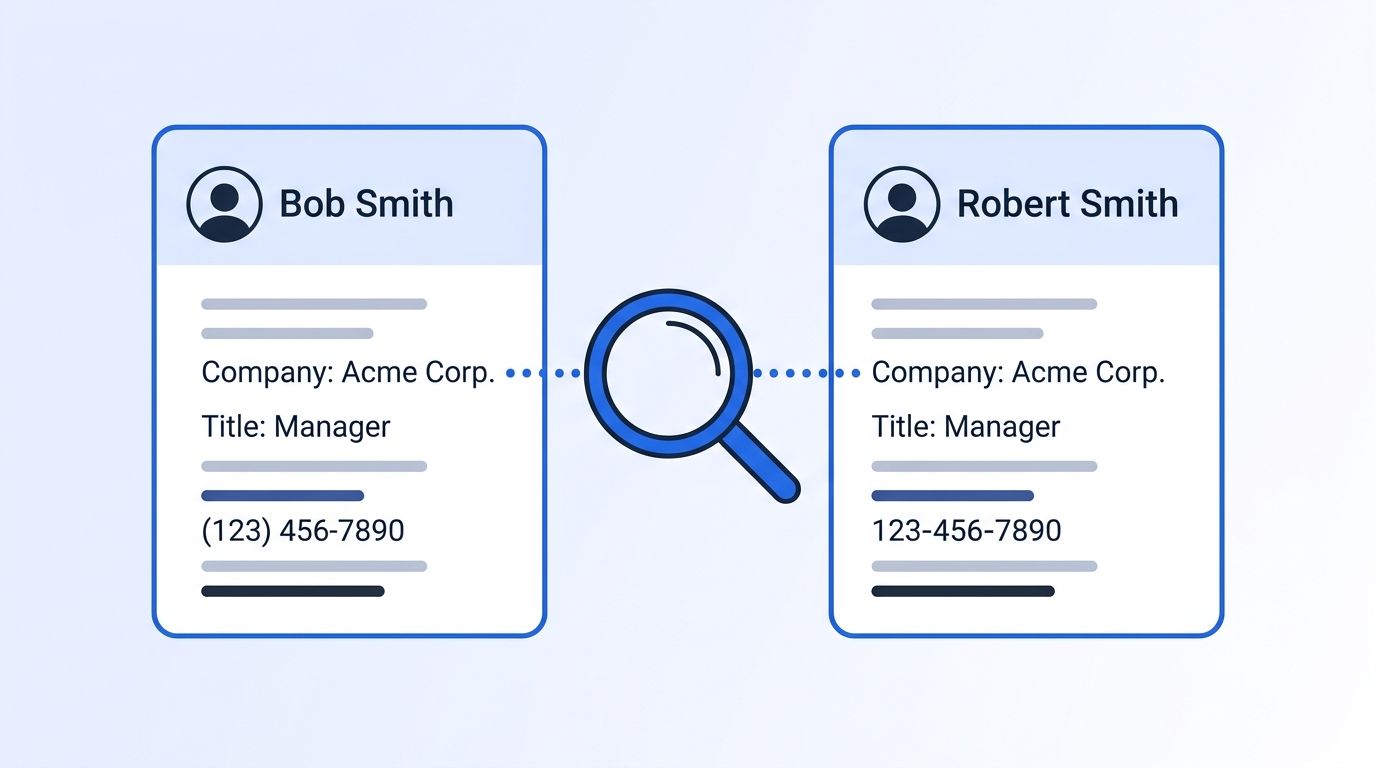
Duplicate record detection is the process of deciding whether two separate records — two rows in your CRM, two rows in a spreadsheet — describe the same real-world person or company. That sounds simple until you realize computers can't just "recognize" that "Bob Smith at Acme Corp" and "Robert Smith, Acme Corporation" are the same guy. Every matching system needs an explicit rule for making that call.
Before you evaluate a dedup tool or build a matching process, you'll want:
- A sample export of 500-1,000 records from your CRM or database (more on why in Step 1)
- Clarity on which fields you actually trust (email? phone? a persistent ID?)
- A stakeholder who owns the "what counts as a duplicate" decision — this is a policy question, not just a technical one
- Time: a first audit takes 1-2 hours; building a full matching + merge process takes 2-4 weeks depending on data volume
- Difficulty: Beginner-to-Intermediate — no coding required to understand this guide, though implementation usually involves your CRM's native tools or a vendor
Step 1: How Bad Is Your Duplicate Record Problem, Really?
By the end of this step, you'll know your actual duplicate rate instead of guessing. Most teams either overestimate ("it's a mess, nobody trusts the CRM") or underestimate ("we run dedup quarterly, we're fine") — an audit replaces both with a number.
Pull a sample of 500-1,000 records and sort by the field most likely to reveal duplicates: company domain, phone number, or last name. Scan for near-matches your CRM's native dedup rule would miss — different capitalization, a trailing "Inc." vs. "Inc," a typo'd domain. Note where each duplicate entered the system: manual entry, a form fill, an API integration, or an import.
<!-- [ORIGINAL DATA] -->What we've seen: across enrichment workflows we run for customers, records created through unattended integrations — web forms, API pushes, bulk imports — consistently carry the highest duplicate rates, because nothing at the point of entry checks against what's already there.
That pattern matches published research. Records created via API or web-form integrations carry an 80% duplicate rate, compared with 19% for manually entered records (Plauti, "The Average Rate of Duplicates in a CRM," 2021). If your integrations write straight to your CRM without a matching check first, that's usually where your problem is concentrated.
Step 2: What Are the Four Core Matching Approaches?
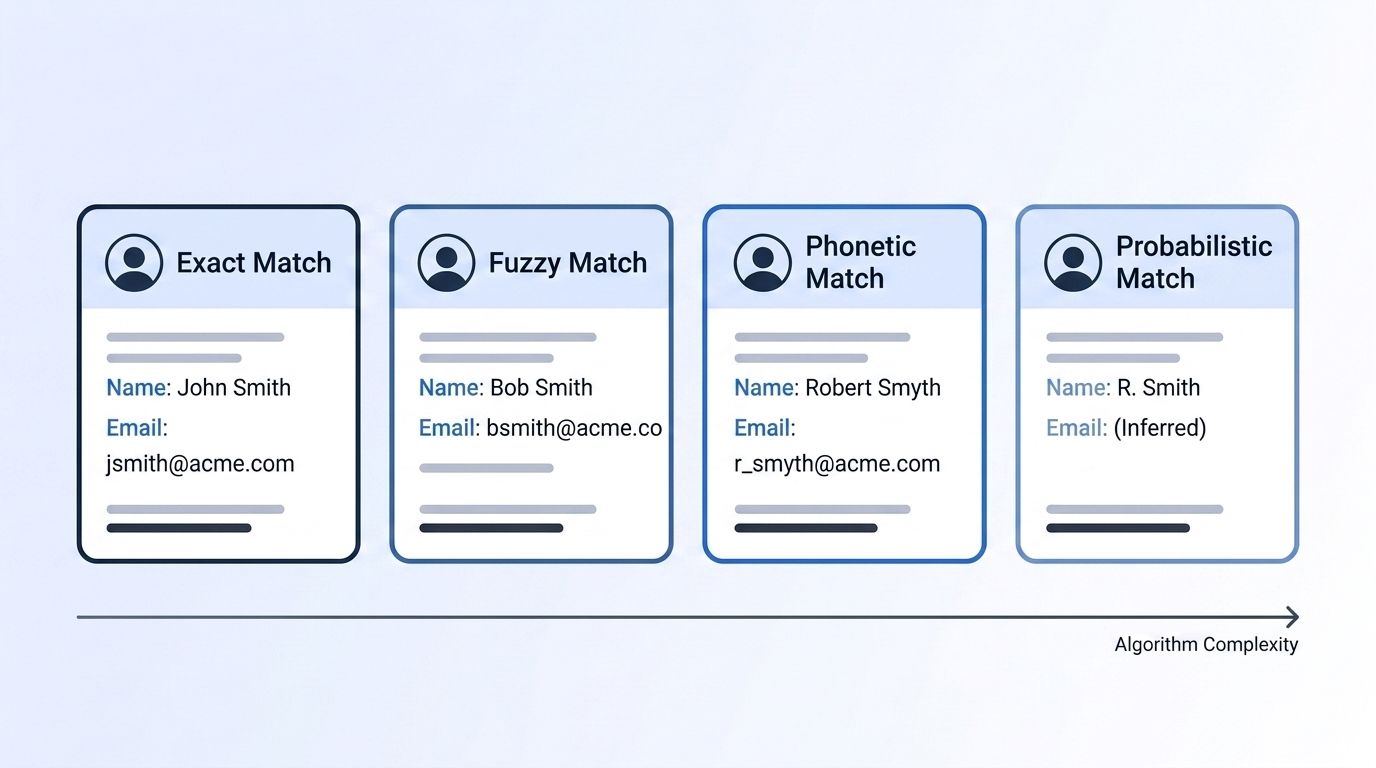
By the end of this step, you'll be able to look at any dedup tool's marketing page and know exactly which technique it's using — and why that matters for accuracy. Most matching tools use one or more of four approaches: exact, fuzzy, phonetic, and probabilistic. They trade off accuracy against computing cost, and none of them is "the best" in isolation.
Exact (deterministic) matching
Two records match only if a specified field is character-for-character identical — same email, same tax ID, same phone number. It's fast, simple, and predictable, but brittle: "Bob Smith" and "Robert Smith," or a single typo'd character, will never match even though they're clearly the same person.
Fuzzy matching
Fuzzy matching scores similarity instead of requiring identity. The most common building block is edit (Levenshtein) distance — the minimum number of single-character insertions, deletions, or substitutions needed to turn one string into another. "Jon" and "John" sit one edit apart. You set a similarity threshold, and anything above it counts as a likely match.
Phonetic matching
Phonetic algorithms like Soundex encode how a name sounds rather than how it's spelled, so "Steven" and "Stephen" produce the same code despite different spelling. This catches variants edit distance can miss, though it's tuned for English pronunciation and less reliable for company names or non-English names.
Probabilistic record linkage
This is the most rigorous approach, formalized by Fellegi and Sunter and applied by the U.S. Census Bureau since the 1990 Decennial Census (U.S. Census Bureau, "An Application of the Fellegi-Sunter Model," 1991). Instead of one rule, it compares records across multiple fields — name, address, phone, company — and calculates the statistical odds that two records describe the same entity, weighting rare-value matches (an unusual last name) more heavily than common ones. The output is a probability score, not a yes/no flag.
This is where a citation capsule earns its keep: probabilistic linkage doesn't ask "are these fields identical?" It asks "given how often each field agrees among records we already know are true matches, how likely is it that these two records are the same entity?" That single reframe is what separates enterprise-grade matching from a basic dedup button.
Step 3: How Does Blocking Keep Matching From Grinding to a Halt?
By the end of this step, you'll understand why large-scale matching tools don't compare every record to every other record — and why that matters for how long a dedup pass takes. Comparing every record against every other record is computationally explosive. A database of 1 million records has roughly 500 billion possible pairs — no system checks all of them in real time. Blocking solves this by first grouping records into buckets sharing a coarse trait — same postal code, same first three letters of a last name, same email domain — and only running the expensive comparison within each bucket (MDPI, "Efficient Record Linkage in the Age of LLMs: The Critical Role of Blocking," 2025).
Blocking is a pre-filter, not a matching method by itself. Pick a bad blocking key and you'll miss real duplicates that don't share that trait — for example, blocking on postal code alone will miss the same person listed twice under their old and new mailing address. This is also where matching against your own existing dataset matters: before you write a new record, checking it against a database you can already search — like Datamagnet's People Search DB — catches duplicates at the point of entry instead of after the fact.
Step 4: How Do You Set Match Thresholds and Confidence Tiers?
By the end of this step, you'll have a working policy for what counts as "same person" — the single decision that determines whether your matching process is trustworthy or noisy. Every fuzzy or probabilistic matching setup needs at least two thresholds, not one. Set the bar too low and you'll auto-merge people who aren't actually the same. Set it too high and duplicates slip through untouched.
A workable three-tier structure:
- Auto-merge zone (high confidence, e.g., 90%+ similarity or probability): merge automatically, no human review
- Review queue (medium confidence, e.g., 60-89%): flag for a human to confirm — this is where most of your team's time should go
- No match (below your lower bound): leave records separate
Teams that skip the review queue tier almost always regret it. Auto-merging everything above a single threshold either merges too aggressively (losing legitimate separate contacts at the same company) or too conservatively (letting obvious duplicates sit for months). The middle tier is what makes the system defensible when someone asks "why did these two records get merged?"
Step 5: What Are Merge and Survivorship Rules?
By the end of this step, you'll know what happens to a record after it's flagged as a duplicate — a step teams frequently skip until it causes a data-loss incident. Detecting a duplicate is only half the job. You also need survivorship rules: when two records merge, which field values win? Common approaches include "most recently updated wins," "most complete record wins" (fewer blank fields), or "the record enriched by a verified source wins." Document this explicitly — an undocumented merge rule is how teams accidentally overwrite a correct phone number with a stale one.
If your matching pulls from a live source rather than a static snapshot, survivorship gets easier: a record refreshed from a real-time source, like Datamagnet's People Profile endpoint or Company Profile endpoint, can simply be treated as the freshest input by default, since it's fetched live at merge time rather than pulled from a database that might be months old.
Step 6: Why Is Matching an Ongoing Process, Not a One-Time Cleanup?
By the end of this step, you'll have a recurring process instead of a quarterly fire drill. Duplicate detection isn't a project with an end date — it's an ongoing control, because 80% of API and web-form records enter as duplicates the moment they're created (Plauti, 2021). The fix has to sit at the point of entry, not just in a periodic cleanup job.
Poor data quality costs organizations an average of $12.9 million a year (Gartner, "Magic Quadrant for Data Quality Solutions"), and IBM's 2025 research found more than 25% of organizations lose over $5 million annually to it, with 7% losing $25 million or more (IBM Institute for Business Value, "Chief Data Officers Redefine Strategies as AI Ambitions Outpace Readiness," November 2025). That's the ongoing cost of treating matching as a one-time project.
If your CRM is HubSpot, pairing a matching process with live LinkedIn enrichment on record creation closes the loop — new records get checked and enriched before they can become the next duplicate, rather than after.
What Are the Most Common Duplicate-Matching Mistakes to Avoid?
Most duplicate-matching failures repeat across teams and trace back to a handful of avoidable choices: relying on exact matching alone, setting one threshold instead of three tiers, ignoring where duplicates enter the system, and skipping survivorship documentation. Each one compounds the same root problem — catching duplicates after they're created instead of before.
1. Relying on exact matching alone. Most native CRM dedup tools default to exact-match rules on one or two fields. This misses the "Bob" vs. "Robert" problem entirely and gives teams false confidence that "we already deduped."
2. Setting one threshold instead of three tiers. A single cutoff either over-merges or under-merges. The review-queue tier from Step 4 isn't optional overhead — it's what catches the edge cases a pure algorithm gets wrong.
3. Ignoring where duplicates enter the system. Cleaning up existing duplicates without fixing the API/form pipeline that created 80% of them (Plauti, 2021) means you'll be back here in three months.
<!-- [UNIQUE INSIGHT] -->What most guides miss: matching quality is capped by the freshness of what you're matching against. A probabilistic model comparing two stale, six-month-old records can be mathematically flawless and still merge the wrong two people, because the underlying data — a changed job, a changed phone number — has already drifted apart. Matching logic and data freshness are the same problem, not two separate ones.
4. Skipping survivorship documentation. An undocumented "which record wins" rule is how correct data quietly gets overwritten by stale data during a merge.
What Success Looks Like
If your matching process is working, your duplicate rate should trend toward the sub-2% range that data-quality practitioners treat as healthy (Leadspace, "How to Audit and Fix Duplicate CRM Records in 2026," 2026), your review queue should shrink week over week instead of growing, and new records created through integrations shouldn't spike your duplicate count the way they did in your Step 1 audit.
A reasonable stretch goal: move from a periodic cleanup job to real-time matching at the point of entry, so new records are checked against your existing database — and against live source data — before they're ever saved as a duplicate in the first place.
Frequently Asked Questions
Duplicate detection raises the same handful of questions across most CRM and RevOps teams, from how detection differs from deduplication to whether matching is a one-time project. The five answers below cover the practical decisions teams get stuck on most, building on the matching techniques, thresholds, and blocking approach covered in the steps above.
What's the difference between deduplication and duplicate record detection?
Duplicate record detection is the analysis step — deciding which records are likely the same entity. Deduplication is the action step — merging or removing them based on that decision. You can detect duplicates with 95%+ confidence and still choose to leave them unmerged pending human review.
Can I use fuzzy matching without probabilistic linkage?
Yes. Fuzzy matching on its own (comparing edit distance on one or two fields) is simpler to implement and works for lower-stakes use cases. Probabilistic linkage, which weighs multiple fields simultaneously, is worth the extra complexity when the cost of a wrong merge — or a missed duplicate — is high, such as sales territory assignment or compliance reporting.
What if my matching tool keeps merging different people with the same name?
This usually means your matching relies too heavily on name fields alone. Add a second discriminating field — company domain, phone number, or a persistent LinkedIn or company ID — and raise your auto-merge threshold so name-only matches route to the review queue instead of merging automatically.
How do I scale duplicate detection across millions of records?
Blocking is the standard answer: group records by a shared coarse trait (domain, postal code, name prefix) and only run detailed matching within each group, not across the entire dataset (MDPI, "Efficient Record Linkage in the Age of LLMs," 2025). For ongoing prevention rather than periodic cleanup, checking new records against a searchable database of enriched profiles at the point of entry avoids the batch-matching problem entirely for new data.
Is duplicate detection a one-time project or an ongoing process?
Ongoing. Since integration-sourced records carry an 80% duplicate rate versus 19% for manual entry (Plauti, 2021), any pipeline that keeps writing new records needs matching built into intake, not just scheduled as an occasional cleanup pass.
Getting This Right Matters More as Your Team Scales
You now know why "duplicate detection" isn't one algorithm — it's a stack of decisions: which matching technique fits your data, where your thresholds sit, who reviews the gray area, and what happens after a merge. Get those decisions documented once, and you stop re-litigating them every time someone asks why the CRM looks messy again.
Sales and RevOps teams building programmatic CRM enrichment workflows, or account executives relying on account research infrastructure, run into this exact problem: enrichment only helps if it isn't writing duplicate records on top of what you already have. If you're evaluating a real-time people enrichment API to fix intake at the source, check current API pricing to see what a matching-aware enrichment layer costs at your data volume.
