
Disclosure: This article is published by Datamagnet. Vendor claims are self-reported unless otherwise noted.
Claude for Recruiting: Source Candidates With MCP and Live Profile Data (2026)
Claude is good at reasoning about candidates. It's bad at knowing who's open to work today, because its training data is frozen. The fix is the Model Context Protocol (MCP): a connector that lets Claude call a live data API mid-conversation. This guide shows you how to build that connector and run a real sourcing search.
TL;DR
- In 2026, SHRM reported that 51% of organizations use AI to support recruiting (SHRM, AI Is Reshaping Talent Acquisition).
- Claude alone can't see fresh profiles. An MCP server gives it live lookups.
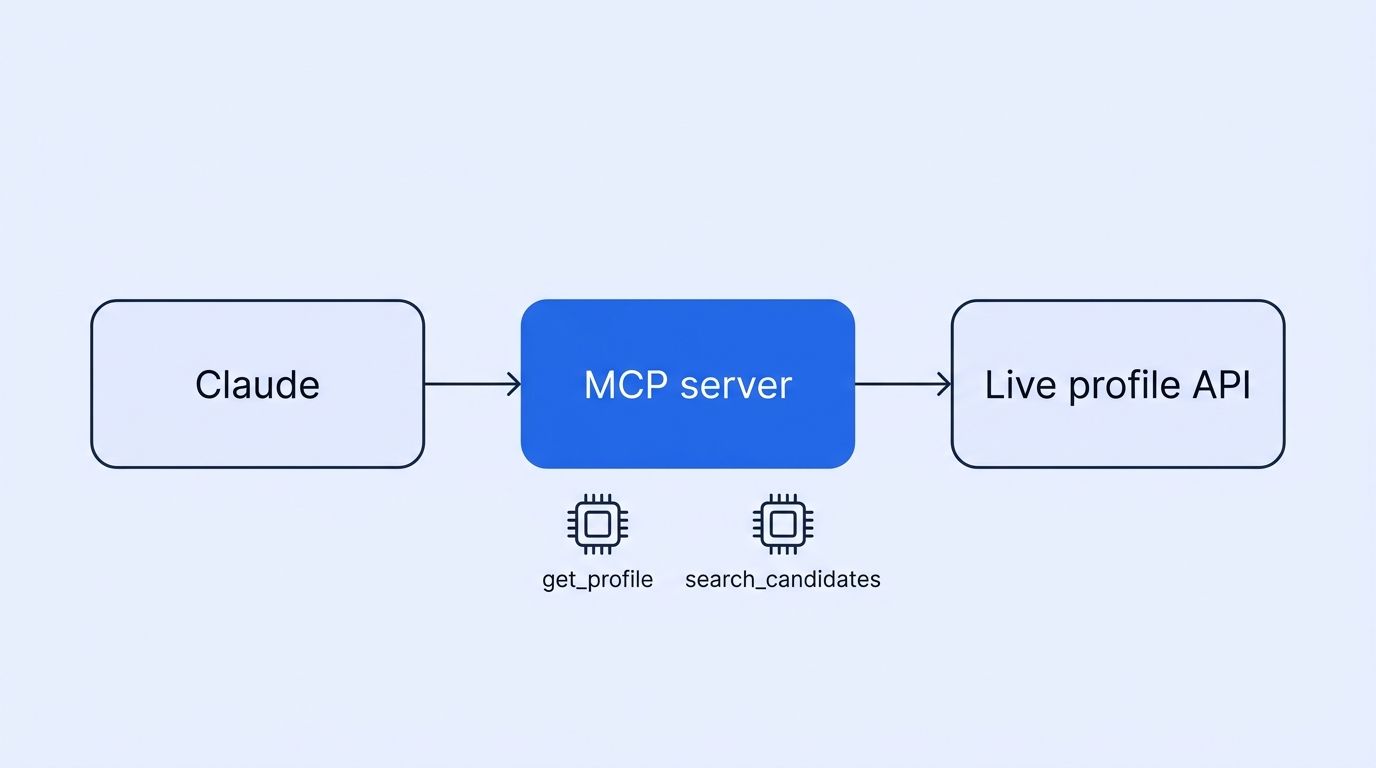
- Datamagnet has no ready-made MCP server in its docs, so you wrap its REST API in a short Python script (about 30 lines below).
- One 25-candidate shortlist costs roughly 35 credits.
Why Does Claude Need Live Data to Source Candidates?
Claude doesn't browse profiles on its own, and people change jobs constantly. In January 2026, the U.S. Bureau of Labor Statistics put median employee tenure at 4.1 years, and 20.6% of workers had been with their employer a year or less (U.S. BLS, Employee Tenure news release, September 2026). A one-year-old snapshot is wrong for a fifth of the workforce.
Recruiting teams already feel the pull toward AI. In 2025, LinkedIn found that 45% of UK organisations were actively integrating or experimenting with generative AI in hiring, up from 31% a year earlier (LinkedIn Talent Solutions, The United Kingdom Future of Recruiting Report 2025). That's the UK edition only. Global figures differ, so don't mix them.
Speed matters too. SHRM's recruiting benchmarking puts the median time to fill a non-executive role at 39 calendar days (SHRM, Recruiting Benchmarking, 2025 edition). Sourcing is the first slice of that clock.
So what do you do about stale data? You give Claude a tool. Our recruiting intelligence page covers the broader workflow. This post covers the Claude part.
The common mistake is pasting a CSV export into a chat and asking Claude to rank it. That ranks old data faster. A live tool call flips the order: Claude decides what to look up, then reasons over what comes back.
What Is MCP, and Why Should Recruiters Care?
MCP is an open standard that lets AI apps call outside tools and data sources in a consistent way. Anthropic introduced it on November 25, 2024 (Anthropic, Introducing the Model Context Protocol). By December 2025, Anthropic reported more than 10,000 active public MCP servers (Anthropic, Donating the Model Context Protocol and establishing the Agentic AI Foundation, 2025-12-09). Those are company-reported counts.
Think of MCP as a USB port for AI. Your sourcing API plugs in once. Then any MCP-aware client can use it.
Here's the part you'll want to know up front. As of 2026-11-18, we found no Datamagnet MCP server in the Datamagnet docs or pricing page. So this guide has you build a thin one yourself. It's a small job, and you control exactly which endpoints Claude can touch.
What Do You Need Before You Start?
You need four things, and the whole setup takes about 30 minutes. None of them is exotic: an account you probably already have, a recent Python install, one API key and a clear idea of the role. Difficulty: beginner to intermediate.
- A Claude account with Claude Desktop or Claude Code installed
- Python 3.10 or newer
- A Datamagnet API key (new accounts get 10 free credits, per the Datamagnet pricing page)
- A target role, written the way you'd brief a human sourcer
Grab your key from the dashboard, then check the authentication docs. Requests use a standard Authorization: Bearer header. The quickstart walks through your first call.
A scope note before we go further. This workflow covers public profile data only. Don't log in with personal accounts or try to get around blocks. LinkedIn's User Agreement (effective November 3, 2025) says members may not use software, scripts or bots to scrape the services, and it reserves the right to restrict or terminate accounts that breach it (LinkedIn, User Agreement). That's the account-ban risk of doing it yourself. This isn't legal advice, so check your own obligations.
Step 1: How Do You Build the MCP Server?
By the end of this step, you'll have a local server that exposes two tools to Claude: one for single profile lookups and one for search. We'll use the official Python SDK, installed with pip install "mcp[cli]" httpx, and keep the whole script short enough to read in one sitting.
Save this as datamagnet_mcp.py:
import os
import httpx
from mcp.server.fastmcp import FastMCP

mcp = FastMCP("datamagnet")
BASE = "https://api.datamagnet.co/api/v1"
HEADERS = {"Authorization": f"Bearer {os.environ['DATAMAGNET_API_KEY']}"}

@mcp.tool()
def get_profile(linkedin_url: str) -> dict:
    """Fetch a live public profile. Costs 1 credit."""
    # Confirm the exact parameter name in the People Profile docs.
    r = httpx.get(f"{BASE}/person", headers=HEADERS,
                  params={"url": linkedin_url}, timeout=60)
    r.raise_for_status()
    return r.json()

@mcp.tool()
def search_people(filters: dict, page: int = 1) -> dict:
    """Search people by ICP filters. Costs 10 credits per page of 25."""
    # Confirm the path in the ICP People Search docs. Filter keys include
    # job_title, seniority, function, location and industry.
    r = httpx.post(f"{BASE}/people-search", headers=HEADERS,
                   json={**filters, "page": page}, timeout=60)
    r.raise_for_status()
    return r.json()

if __name__ == "__main__":
    mcp.run()
The /person path comes from the Datamagnet docs, and the People Profile reference is the source of truth for parameters. We haven't tested your account's response shape, so print one result before you trust it.
The second tool, search_people, wraps search. It follows the ICP People Search endpoint to find people by title, seniority, function, location and industry. Copy the exact filter names from the filter reference.
Verify it: run python datamagnet_mcp.py. It should start and wait silently. That's normal for a stdio server.
Step 2: How Do You Connect It to Claude?
By the end of this step, Claude will list your tools and be ready to call them. You have two routes, depending on which client you use: a single command for Claude Code, or a short config edit for Claude Desktop. Pick one and follow it through.
Claude Code. Run one command, with your key in the environment (Claude Code docs, Connect to tools via MCP):
claude mcp add --transport stdio --env DATAMAGNET_API_KEY=your_key \
  datamagnet -- python /ABSOLUTE/PATH/TO/datamagnet_mcp.py
Then run claude mcp list to confirm it registered. Inside a session, /mcp shows its status.
Claude Desktop. Open Settings, then Developer, then Edit Config. Add an mcpServers entry to claude_desktop_config.json (Model Context Protocol, Connect to local MCP servers):
{
  "mcpServers": {
    "datamagnet": {
      "command": "python",
      "args": ["/ABSOLUTE/PATH/TO/datamagnet_mcp.py"],
      "env": { "DATAMAGNET_API_KEY": "your_key" }
    }
  }
}
Restart Claude Desktop fully. Don't just close the window. Use absolute paths, because a relative path is the usual reason a server silently fails to appear.
Never paste your API key into a chat. Keep it in the environment or the config file only.
Step 3: How Do You Write a Sourcing Brief Claude Can Act On?
By the end of this step, you'll have a prompt that returns a usable shortlist. Vague briefs waste credits, because Claude will search broadly and enrich too many profiles. A specific brief, written the way you'd hand work to a human sourcer, keeps both the results and the spend tight.
A good brief has five parts: role, seniority, location, must-haves and exclusions. Try this:
Find 25 senior backend engineers in Berlin or remote-EU with Kubernetes and Go on their profile. Exclude anyone at my current employer. Search first, then pull full profiles only for the top 10 matches. Score each against my must-haves and say why in one sentence.
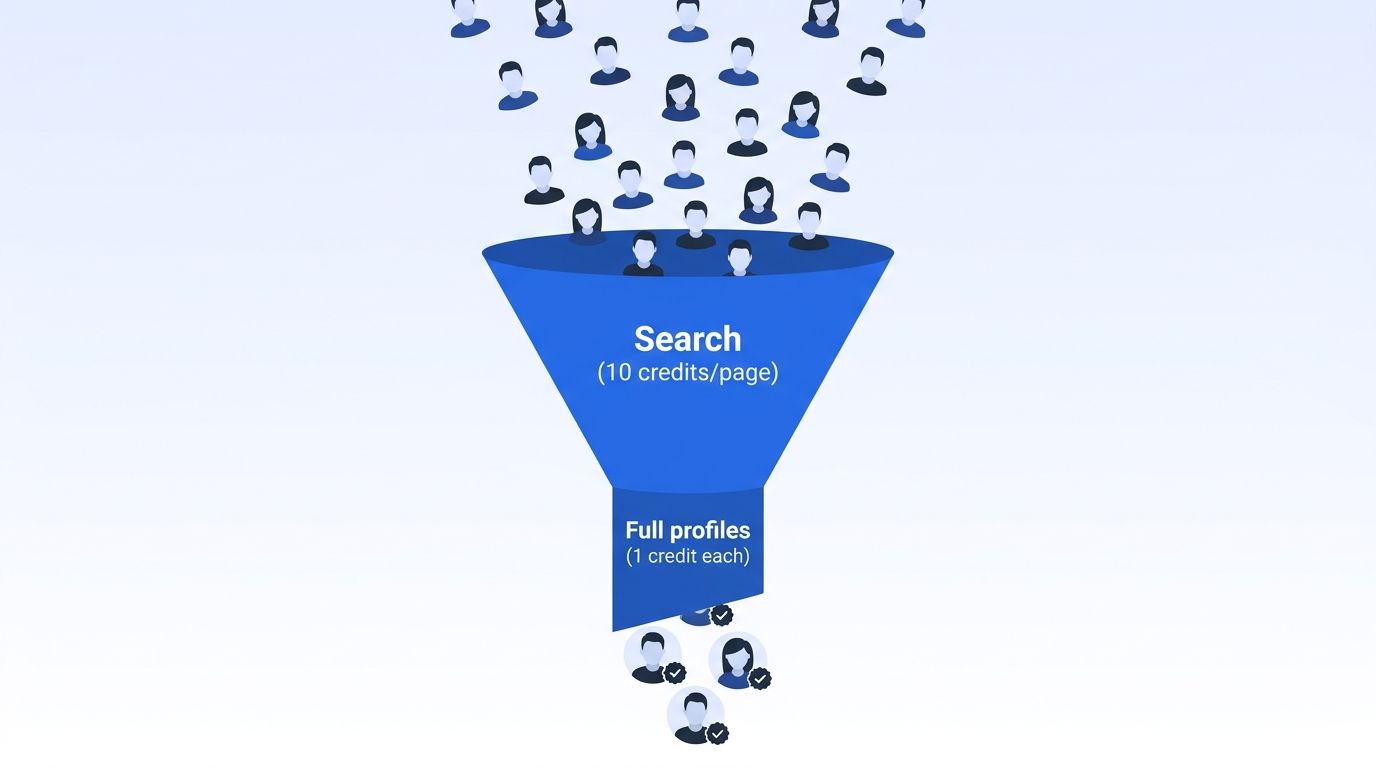
Notice the order. A search page returns 25 candidates for 10 credits, while full profiles cost 1 credit each. Telling Claude to search first, then enrich a subset, keeps spend low. This is the same two-stage pattern behind our ICP Search API.
If you'd rather query profiles you've already enriched, point a tool at the People Search DB endpoint. It supports include and exclude filters for company LinkedIn URLs. The people search database page explains the trade-offs.
Ask Claude to explain each rejection, not just each pick. Rejection reasons are how you spot a bad filter early, before you've paid for 25 profiles that all miss the same must-have.
How Much Does a Claude Sourcing Run Cost?
A 25-candidate shortlist costs about 35 credits: one search page plus 25 profile lookups. The credit rates come from the Datamagnet pricing page: 1 credit per profile and 10 credits per search page. The arithmetic below is ours.
| Item | Credits | Source for the rate |
|---|---|---|
| One ICP search page (25 results) | 10 | Datamagnet ICP Search API |
| One full profile | 1 | Datamagnet pricing |
| 25 profiles | 25 | Datamagnet pricing, rate times 25 |
| Total per shortlist | 35 | Sum of the rows above |
| Starter plan allowance ($39/month) | 1,000 credits, about 28 shortlists | Datamagnet pricing, divided by 35 |
Larger plans are $99 and $199 a month, and pay-as-you-go is available. Failed requests aren't charged, per the pricing page. Check the page for current rates before you budget.
One more limit worth knowing. The API introduction describes profile, company, post and signal data, and we found no email lookup, phone lookup or job-listing search in the docs. Check the docs for current endpoints. So pair this workflow with your own outreach tools, and use Claude to decide whom to contact.
Step 4: How Do You Keep the Shortlist Fresh?
By the end of this step, you'll have a monitor that flags when a candidate moves. Sourcing isn't one-and-done, because a "not now" in March can be a "yes" in June. A job change is often the best moment to reach back out, so let the data tell you when.
Datamagnet's Signal API monitors LinkedIn profiles for job changes and new posts, then delivers alerts by email or signed webhooks. The Create Signal docs show how to start a monitor. Our champion tracking page describes the same pattern for sales.
For recruiters, swap "champions" for "silver medalists." Add finalists you couldn't hire to a job-change monitor. When one moves, re-engage with fresh context. Claude can draft that message from the new profile.
What Mistakes Should You Avoid?
Most failures come from setup, not from the model. In our experience, the same four problems account for nearly every disappointing run: runaway enrichment, unchecked scores, over-delegated decisions and vague tool descriptions. Here's each one, with the fix we'd apply first.
1. Letting Claude pull every profile. A broad search followed by 100 lookups burns credits fast. Cap enrichment in your brief, for example "top 10 only."
2. Trusting scores without reading the evidence. Claude can rank confidently on thin data. Ask for the exact profile lines behind each score.
3. Using it for decisions it shouldn't make. AI screening has bias and compliance risks that vary by jurisdiction. Keep a human in the loop for every reject decision. This isn't legal advice.
4. Writing a vague tool description. Claude chooses tools from their docstrings. If your docstring doesn't mention cost, Claude may call a tool too often. State the credit cost in the docstring.
What Does Success Look Like?
If it works, you'll ask for a shortlist in plain English and get ranked candidates with reasons, in minutes instead of an afternoon. You should see Claude announce each tool call, then summarize. Check one profile by hand against the source to confirm the data matches.
As a stretch goal, add a get_company tool so Claude can check headcount and growth before it recommends a candidate's employer as a target. The Company Profile docs cover the fields.
Frequently Asked Questions
Does Claude have built-in access to LinkedIn data for recruiting?
No. Claude can't browse or look up profiles by default. You connect it to a data source through MCP, or paste profile text in yourself. Without a live source, Claude answers from training data that may be months old. According to the BLS, about 20.6% of workers have held their job a year or less, so stale answers are common.
Is there a Datamagnet MCP server I can install?
Not that we found. As of 2026-11-18, the Datamagnet docs and pricing page don't list an MCP server. This guide shows you how to wrap the REST API in a small Python server yourself. That takes about 30 minutes, and it lets you expose only the endpoints you want Claude to use.
How much does it cost to source candidates with Claude?
The data side is credit-based. A 25-candidate shortlist uses about 35 credits: 10 for one search page and 1 per profile. The $39 Starter plan includes 1,000 credits, which covers roughly 28 such shortlists. Claude usage is billed separately by Anthropic under your own plan.
Can I use Claude for recruiting without writing code?
Partly. You can paste profile text into Claude for screening and summarizing with no code at all. Live lookups need an MCP server, though, and that means a small script. If you don't want to write one, no-code tools like Clay can call Datamagnet as an enrichment source instead.
Is it okay to scrape LinkedIn for candidates?
LinkedIn's User Agreement bars scraping and unauthorized automation, and it allows account restriction for breaches. That's the account-ban risk of DIY scraping with your own login. Using a data API that collects public profile data avoids running automation on your account. We're not giving legal advice, so review the terms with your own counsel.
Ready to Try It?
You now have the pieces: a small MCP server, a connected Claude client, a brief that controls spend, and a signal monitor to keep it fresh. Start with the free credits and one real role. Find your next hire with live profile data, and read the Datamagnet quickstart for your first call.
Sources
- SHRM, "AI Is Reshaping Talent Acquisition", retrieved 2026-11-18, https://www.shrm.org/in/topics-tools/news/blogs/ai-reshaping-talent-acquisition
- U.S. BLS, "Employee Tenure" news release, retrieved 2026-11-18, https://www.bls.gov/news.release/tenure.nr0.htm
- LinkedIn Talent Solutions, "The United Kingdom Future of Recruiting Report 2025", retrieved 2026-11-18, https://business.linkedin.com/talent-solutions/resources/future-of-recruiting-uki
- SHRM, "Recruiting Benchmarking" (2025 edition), retrieved 2026-11-18, https://www.shrm.org/topics-tools/research/2025-recruiting-benchmarking
- Anthropic, "Introducing the Model Context Protocol", retrieved 2026-11-18, https://www.anthropic.com/news/model-context-protocol
- Anthropic, "Donating the Model Context Protocol and establishing the Agentic AI Foundation", 2025-12-09, retrieved 2026-11-18, https://www.anthropic.com/news/donating-the-model-context-protocol-and-establishing-of-the-agentic-ai-foundation
- Model Context Protocol, "Connect to local MCP servers", retrieved 2026-11-18, https://modelcontextprotocol.io/docs/develop/connect-local-servers
- Claude Code docs, "Connect Claude Code to tools via MCP", retrieved 2026-11-18, https://code.claude.com/docs/en/mcp
- LinkedIn, "User Agreement" (effective 2025-11-03), retrieved 2026-11-18, https://www.linkedin.com/legal/user-agreement
- Datamagnet, "Pricing", retrieved 2026-11-18, https://www.datamagnet.co/pricing/
