
Disclosure: This article is published by Datamagnet. Vendor claims are self-reported unless otherwise noted.
How to A/B Test Enrichment Vendors Without Breaking Your Pipeline
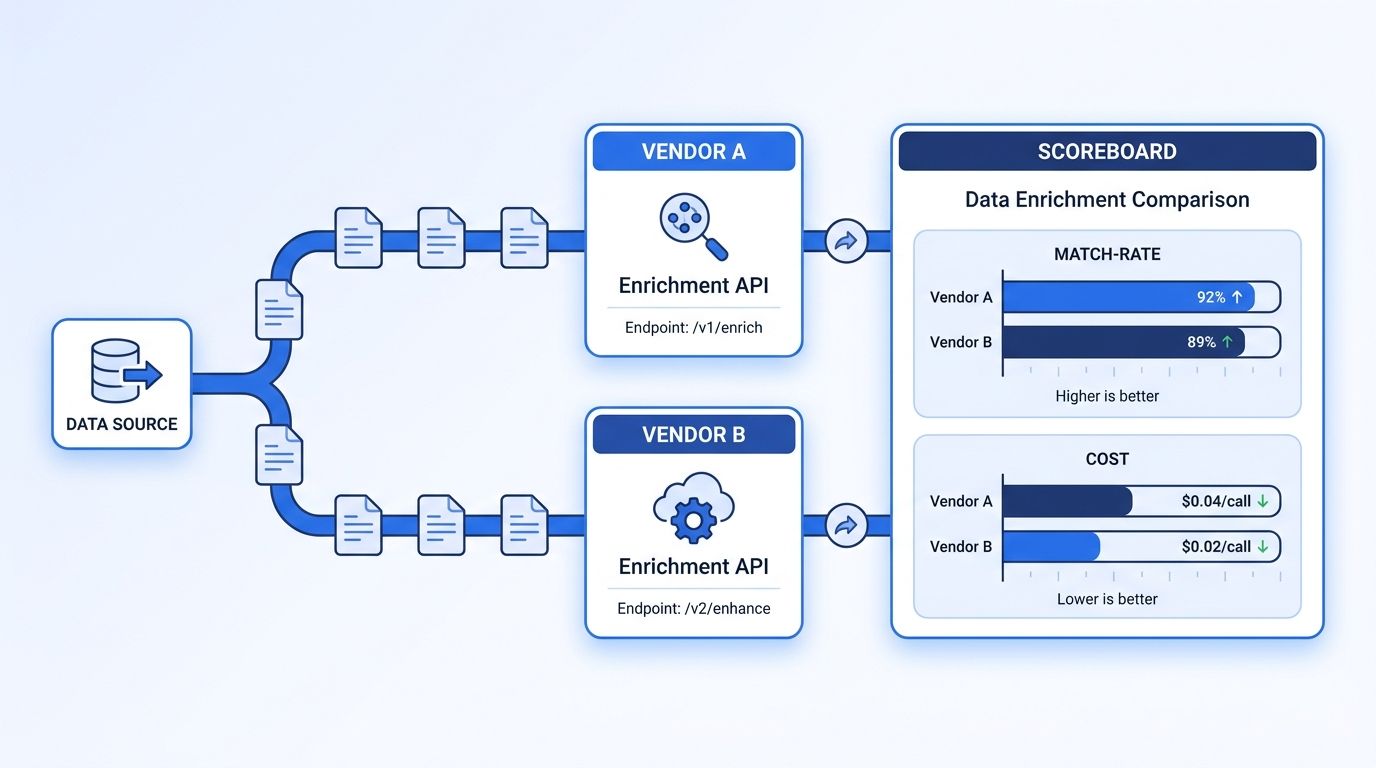
An independent benchmark of eight company-enrichment APIs found field accuracy ranging from 89.0% to 92.6% on the same 282 human-reviewed companies, with per-record cost swinging from $2.76 to more than $4.23 (Openbenchmarks, Company Enrichment API Benchmark, updated August 2026). If you're only trusting a vendor's own marketing page to make that call, you're picking blind.
The problem is that swapping enrichment vendors in a live pipeline is risky. Cut over too fast and a bad field mapping silently corrupts every record downstream - CRM fields, routing rules, personalization tokens, all of it. This guide walks through a six-step framework for testing two vendors side by side, in production, without letting either one touch your source of truth until you're sure.
Key Takeaways
- Field accuracy across enrichment vendors ranges from 89.0% to 92.6%, and cost per record from $2.76 to $4.23+, on the same benchmark set (Openbenchmarks, 2026).
- In 2025, 71% of RevOps and GTM professionals said poor data quality was actively hurting go-to-market execution, and only 11% rated their data "excellent" (RevOps Co-op, Openprise, 2025).
- Route a fixed percentage of live records to a shadow vendor call, log both results, and never let the shadow path write back to your CRM until the comparison window closes.
- B2B contact data decays roughly 2.1% a month, so a test that runs longer than 60-90 days needs its own re-verification checkpoint or you'll be comparing stale data (HubSpot, Database Decay Simulation, citing MarketingSherpa research).
- Score vendors on match rate, field-level accuracy, latency, cost per record, and downstream conversion together - not on price or match rate alone.
What Do You Need Before You A/B Test an Enrichment Vendor?
Before you touch a single record, line up three things: API access to both vendors (trial or paid), a snapshot of at least 500-1,000 records that already have known-good values for a few fields, and a place to log side-by-side results that isn't your production CRM. You'll also want to decide up front which fields actually matter to your team - email, direct dial, title, company size, funding stage - so you're not scoring vendors on fields nobody downstream uses.
Time needed: 2-4 weeks for a meaningful sample, plus 1-2 hours of setup. Difficulty: Intermediate - some API and scripting familiarity helps, but no deep infrastructure work is required.
If you're new to what "programmatic enrichment" even buys you over manual lookups, see how programmatic CRM enrichment compares to manual research before you start testing vendors against each other.
Step 1: What Does "Better" Actually Mean Before You Run the Test?
By the end of this step, you'll have a written scorecard that both vendors get judged against - not a gut feeling. Most A/B tests fail before they start because nobody agreed on what "winning" looks like.
Write down four to six metrics and weight them by what actually costs your team money or deals. A common mistake is weighting match rate above everything else, when a vendor with a 95% match rate but 15% field-error rate can do more damage than one with an 88% match rate and clean fields. Decide your minimum bar for each metric before you see a single result - it's much harder to stay objective once you're staring at numbers that favor the vendor you already liked.
Suggested scorecard categories:
- Match rate - % of input records the vendor returns any data for
- Field-level accuracy - % of returned fields that match verified ground truth
- Fill rate - % of your priority fields (not just any field) that come back populated
- Latency - median and p95 response time per record
- Cost per record - actual spend, including any minimum commitments
- Downstream conversion - reply rate, connect rate, or whatever your team already tracks
Step 2: How Do You Architect the Test So a Bad Vendor Can't Touch Production?
By the end of this step, you'll have a pipeline shape where a failing vendor call can't corrupt a live record. This is the step teams skip when they're in a hurry, and it's the one that causes the "why do half our leads have garbage titles" incident three weeks later.
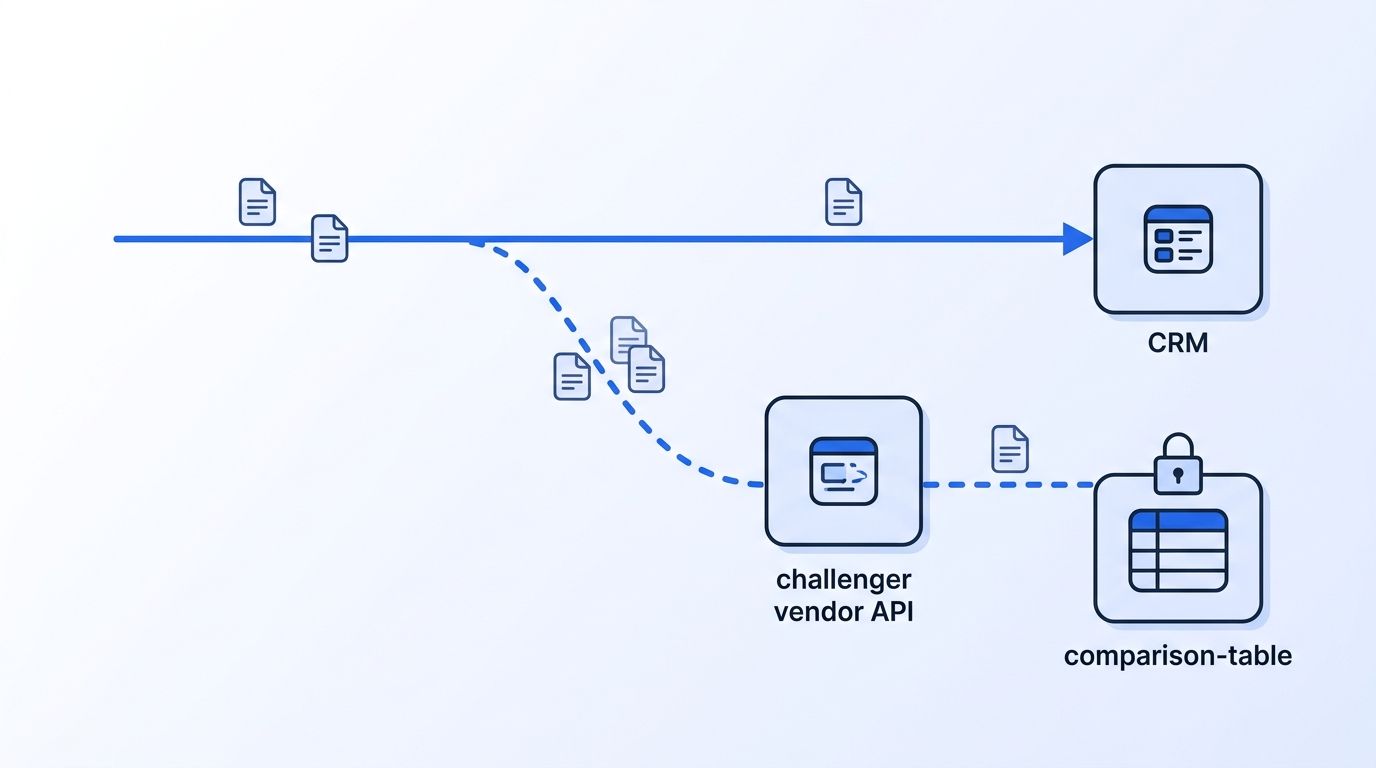
Run the challenger vendor in shadow mode: every record still goes through your current, trusted enrichment path as normal, and a copy of the same record also gets sent to the vendor you're testing - but the shadow result gets written to a comparison table, never to your CRM. This pattern mirrors how software teams validate a new service version against production traffic before a real cutover (CNCF, Cloud Native 2024 Annual Survey, published April 2025 - CI/CD adoption for cloud-native deployments rose to 60% of organizations, up 31% year-over-year).
Wrap both vendor calls in the same retry and timeout logic, and give each request an idempotency key so a retried call after a timeout doesn't create a duplicate write or double-charge your credits. Check Datamagnet's API documentation for an example of how request structure and error codes are documented, since you'll want the same clarity from whichever vendor you're testing.
<!-- [UNIQUE INSIGHT] -->Most teams treat "the vendor is down" and "the vendor is slow" as the same failure case. They're not. A timeout at the p99 tail can silently skew your latency comparison toward whichever vendor you gave a longer timeout window - set identical timeout thresholds for both vendors before you collect a single data point, or the comparison isn't fair.
Step 3: How Do You Split Records Without Breaking Idempotency?
By the end of this step, every record in your test will have a deterministic, repeatable assignment to a vendor arm - so you can rerun or extend the test without contaminating results. Random splitting sounds simple until a re-run of your job assigns the same record to a different vendor the second time.
Hash a stable identifier - company domain, LinkedIn URL, or record ID - into a bucket, and use that bucket to assign the vendor arm. That way, the same record always lands in the same arm even if your job restarts, retries, or runs across multiple workers. Reserve a small control slice (5-10%) that gets enriched by both vendors on every record, purely for a head-to-head parity check on your highest-value accounts.
For the actual data pull, look at what each vendor's endpoint structure supports before you build your splitter. Datamagnet's company profile endpoint and people profile endpoint return structured JSON per request, which makes field-level diffing between vendors far easier than reconciling two differently shaped payloads by hand.
Step 4: How Do You Score Match Rate, Fill Rate, and Field-Level Accuracy?
By the end of this step, you'll have hard numbers instead of impressions for the quality half of your scorecard. This is where most of the real signal lives.
As of August 2026, an independent benchmark testing eight company-enrichment APIs against 282 human-reviewed companies - with no pay-for-placement in the results - found field accuracy of 92.6% for Apollo and 89.0% for People Data Labs, two of the vendors tested, alongside match-rate variance where some providers returned data for essentially every record and others noticeably fewer (Openbenchmarks, Company Enrichment API Benchmark, updated August 2026). That gap compounds fast at scale - a few points of field accuracy on 50,000 records a month is thousands of records with a subtly wrong title or headcount.
Citation capsule: Independent, non-pay-to-play benchmarking of company enrichment APIs shows field accuracy differs by several points between major vendors on identical company sets. A few percentage points sound small until you multiply them across tens of thousands of monthly enrichment calls, where the gap turns into thousands of wrong titles, headcounts, or industries feeding your segmentation logic.
Does the field just look populated, or is it actually right? Those are two different questions, and most teams only check the first one. Pull a random sample of 50-100 records from each vendor's results and manually verify against LinkedIn or the company's own site. If you don't have bandwidth for full manual review, at minimum spot-check the fields your routing rules or lead scoring actually depend on.
Step 5: How Do You Compare Latency, Cost per Record, and Downstream Conversion?
By the end of this step, you'll know which vendor is actually cheaper once you account for what a slow or wrong enrichment call costs you elsewhere - not just the sticker price per credit.
The same August 2026 Openbenchmarks study found median response latency ranging roughly 274-309ms across the eight tested vendors, and per-record cost spanning $2.76 to more than $4.23 depending on the provider and plan tier (Openbenchmarks, 2026). If your pipeline is synchronous - enriching a lead the moment it hits your CRM - even a 30ms difference multiplied across thousands of daily lookups adds up to real queue time. Check whichever vendor you're testing against exposes a live credit balance endpoint so your team can watch spend in real time instead of getting surprised by an invoice at the end of the test window.
B2B contact and company data also decays while your test is running, which matters more the longer your test drags on. B2B database records decay at roughly 2.1% a month, an annualized rate near 22.5%, based on MarketingSherpa research built into HubSpot's decay modeling (HubSpot, Database Decay Simulation). Separately, field-level decay isn't even - direct-dial phone numbers decay an estimated 25-35% a year, and email addresses closer to 40%+ a year when compounded monthly, with job titles typically the fastest-changing field of all (ZoomInfo, B2B Data Decay, updated June 2026 - note this is vendor-reported data, so treat it as directional rather than independently audited).
<!-- [ORIGINAL DATA] -->Running HubSpot's published 2.1%-a-month decay rate forward shows why a long A/B test quietly stops being fair: at that pace, a batch of records is down to roughly 93.8% still-accurate after 3 months, 88% after 6 months, and 77.4% after a full year. If your test runs 90 days, the records you scored on day 1 aren't the same quality as the records you're scoring on day 90 - which is exactly why the comparison needs a re-verification checkpoint, not a single snapshot.
So which number should actually tip the scale - the cost per record, or the pipeline it quietly costs you downstream? Track a downstream number - reply rate, connect rate, or meeting-booked rate - segmented by which vendor enriched the record. A vendor can win on match rate and cost and still lose here if its data is stale or its titles are consistently off, which is often the number that actually decides the vendor question for your leadership.
Step 6: Decide, Cut Over, and Keep a Rollback Path Open
By the end of this step, you'll have moved from "testing" to "using" the winning vendor - without a hard cutover that leaves you stuck if something breaks. Isn't the whole point of running a careful test to avoid exactly that kind of all-or-nothing bet?
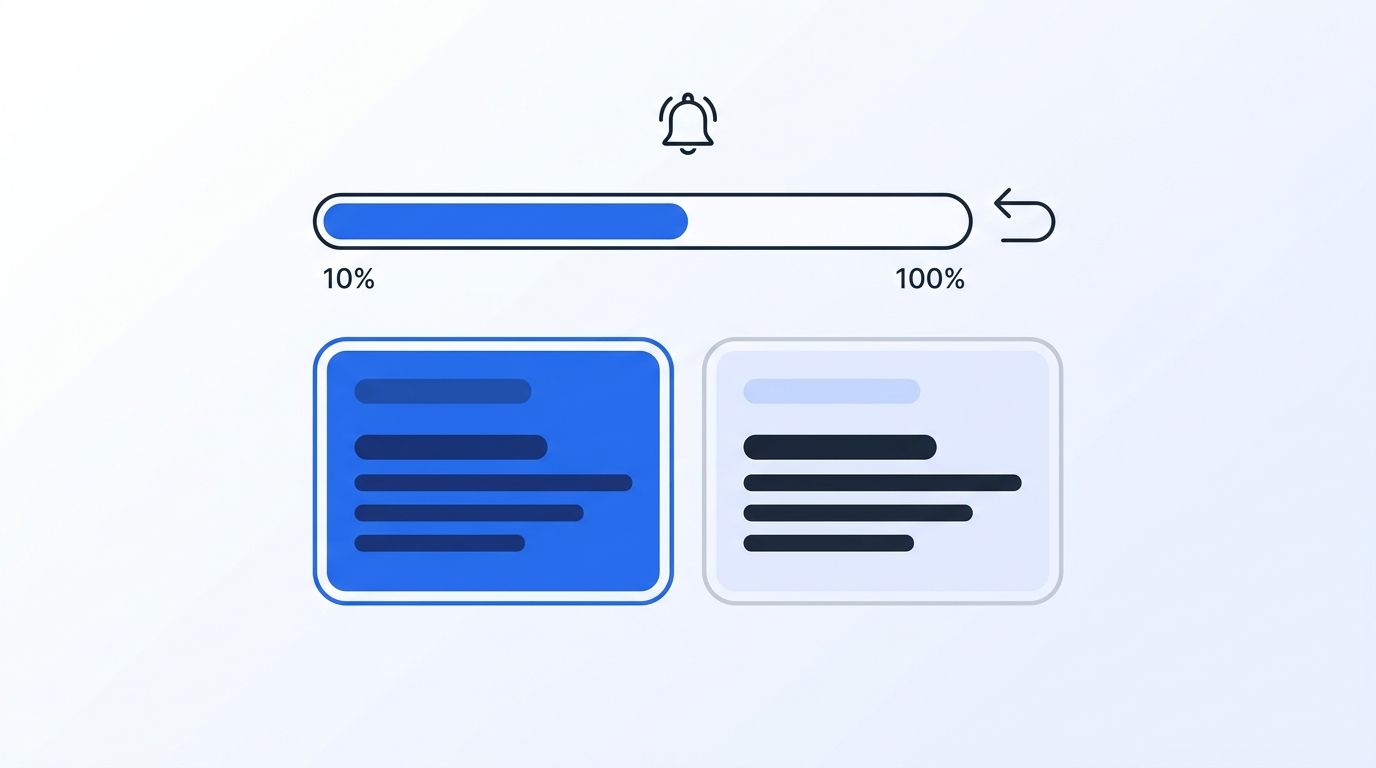
Once your scorecard has a clear winner across enough records to trust the sample - generally a few thousand, depending on how tight the vendors are on your top metrics - move the winning vendor from shadow mode to a small percentage of live writes (10-20%), then ramp gradually while watching your downstream conversion number for a dip. Keep the losing vendor's integration code in place, dormant but ready, for at least one full billing cycle in case you need to fall back fast. If your architecture supports it, wire up a signal webhook so your team gets notified the moment enrichment failure rates spike past a threshold during the ramp, instead of finding out from a rep complaint.
Poor data quality isn't a hypothetical cost to get this decision right - in 2025, a survey of more than 600 RevOps and GTM professionals found 71% said data quality problems were actively hurting go-to-market execution, and only 11% rated their own data "excellent" (RevOps Co-op and Openprise, 2025 State of RevOps Data Quality Survey, January 2025). A careful vendor switch is one of the more direct ways a GTM engineering team can move that number.
Common Mistakes to Avoid When You A/B Test Enrichment Vendors
Would you rather have a vendor that answers every request with a shaky guess, or one that says less but gets it right? The single most common mistake is judging a vendor test purely on match rate, because a high match rate with sloppy field accuracy causes more downstream damage than a lower match rate with clean data. Three more mistakes show up often enough to call out specifically.
Comparing vendors on different record sets. If Vendor A gets your enterprise accounts and Vendor B gets your SMB list, you're not running an A/B test - you're running two unrelated pilots and pretending the results are comparable.
Skipping the cost-of-bad-data math entirely. A long-cited rule of thumb in data quality holds that it costs roughly $1 to verify a record at the point of entry, $10 to clean it once it's already spread through downstream systems, and $100 or more once a bad decision gets made on it (Matillion, The 1-10-100 Rule of Data Quality). Catching a vendor's field errors in shadow mode is the cheapest point in that curve - a full production cutover without a test is the most expensive.
Ignoring how little your team trusts the current data already. Only 35% of sales professionals say they completely trust the accuracy of their organization's data (Salesforce, State of Sales Report, 6th Edition, July 2024). If reps already work around bad data by ignoring it, your downstream conversion metric during the test may be muddied by that existing distrust - worth calling out to stakeholders before you present results.
What Success Looks Like After the Test
If your framework worked, you should have a scorecard with clear numbers across all five metrics, not just a preference. You should be able to point to the specific fields where the winning vendor pulled ahead, the cost delta at your actual volume, and a downstream conversion number that moved in the direction you'd expect. You should also still have the losing vendor's integration dormant and ready, in case the winner's performance drifts after the honeymoon period.
Compare Datamagnet's field accuracy and pricing against your current enrichment vendor or see how Datamagnet stacks up against Apollo - most teams can get a shadow-mode test running against either comparison in an afternoon.
Frequently Asked Questions
What's the difference between A/B testing and shadow testing an enrichment vendor?
A true A/B test splits live traffic between two vendors and lets both results reach production, usually with monitoring to catch problems fast. Shadow testing runs the challenger vendor in parallel without letting its output touch production at all - safer for a vendor swap, since a bad field mapping never reaches your CRM until you've already validated the results.
How many records do you need for a statistically valid enrichment vendor test?
A few thousand records per vendor arm is a reasonable floor for most B2B teams, though the exact number depends on how close the vendors are on your top metrics. If two vendors differ by only a point or two on match rate, you'll need a larger sample to trust the difference isn't noise; a 3-4 point gap, like the one Openbenchmarks found between Apollo and People Data Labs, tends to show up reliably at a smaller sample size.
Can you A/B test two enrichment vendors without paying for both at once?
Most vendors offer a free trial or a capped number of credits, which is usually enough to run a shadow test on a meaningful sample without a full paid commitment to both. Check each vendor's credit balance endpoint or usage dashboard so you don't accidentally burn through trial credits before your sample size is large enough to trust.
What happens if the new vendor fails mid-test?
Because shadow mode never lets the challenger vendor write to production, a failure on its side simply means that batch of comparison data is incomplete - your primary pipeline keeps running on the trusted vendor without interruption. Log the failure rate itself as a metric; a vendor that fails 5% of requests during a test is unlikely to get more reliable once you're depending on it in production.
How long should an enrichment vendor A/B test run?
Two to four weeks is enough for most teams to gather a meaningful sample without letting data decay skew the comparison, since B2B contact data decays roughly 2.1% a month. If your test needs to run longer to hit volume thresholds, add a re-verification checkpoint partway through so you're not comparing fresh data from one vendor against data that's already gone stale.
Put the Framework to Work
A vendor swap doesn't have to be a leap of faith. Define your scorecard, run the challenger in shadow mode, split records deterministically, and score match rate, accuracy, cost, and downstream conversion together before you cut over. That sequence is what turns "we think the new vendor is better" into a number you can defend to your VP of RevOps.
See how Datamagnet's real-time enrichment API performs on your own records - most teams can wire up a shadow-mode test against their current vendor in under an hour using Datamagnet's quickstart guide.
Sources
- Openbenchmarks, Company Enrichment API Benchmark, retrieved 2026-08-11, https://openbenchmarks.com/company-enrichment
- RevOps Co-op, MarketingOps Co-op, and Openprise, 2025 State of RevOps Data Quality Survey, retrieved 2026-08-11, https://www.openprisetech.com/resources/2025-state-of-revops-data-quality
- HubSpot, Database Decay Simulation (citing MarketingSherpa research), retrieved 2026-08-11, https://www.hubspot.com/database-decay
- ZoomInfo, B2B Data Decay, retrieved 2026-08-11, https://pipeline.zoominfo.com/marketing/b2b-data-decay
- Salesforce, State of Sales Report, 6th Edition, retrieved 2026-08-11, https://www.salesforce.com/resources/research-reports/state-of-sales/
- CNCF, Cloud Native 2024 Annual Survey, retrieved 2026-08-11, https://www.cncf.io/announcements/2025/04/01/cncf-research-reveals-how-cloud-native-technology-is-reshaping-global-business-and-innovation/
- Matillion, The 1-10-100 Rule of Data Quality: A Critical Review for Data Professionals, retrieved 2026-08-11, https://www.matillion.com/blog/the-1-10-100-rule-of-data-quality-a-critical-review-for-data-professionals
